Kubernetes is not autonomous and requires assistance from cloud services to take care of the networks, hard drives, servers, and load balancers. This is done in the background and thus remains invisible to the user. However, it is only when things go wrong that such interactions become important. The pod might be operating, but the network and hard drive issues remain. Learning about how different elements communicate with each other would help learners identify problems and effectively manage their applications. A Cloud Computing Course would prove helpful for such learners.
How Kubernetes Talks to the Cloud?
Kubernetes manages applications that are running within containers. It counts how many pods should be running and ensures that their state is maintained. However, Kubernetes does not handle all cloud services alone.
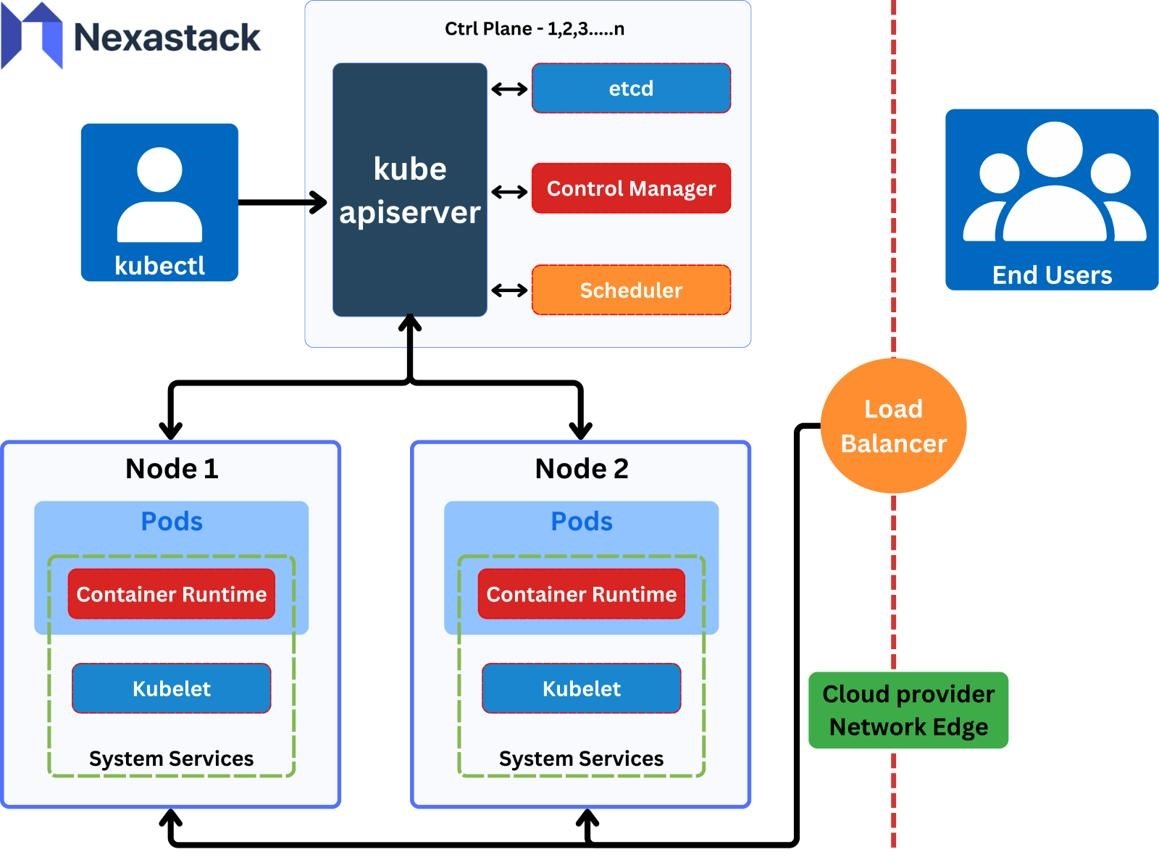
To do this, Kubernetes uses a service known as the Cloud Controller Manager (CCM). CCM acts as the connector between Kubernetes and the cloud provider. It aids in performing various operations including checking the details of servers, configuring the network route and creating the load balancers.
When the user wants to create a load balancer, Kubernetes stores this information. A controller detects this change and issues a request to the cloud provider. The cloud provider creates the load balancer and gives back its details.
This process might sound easy; however, every step must go well. If there is an issue like the cloud API being slow or missing permission, the load balancer creation may become longer.
What Happens After a Request?
In case a user applies a YAML file, Kubernetes will not immediately generate all cloud resources. There are different components for different purposes.
The general flow of events is as follows:
● A user applies a YAML file.
● The Kubernetes API server validates and stores the request.
● There is an event detected by the controller.
● The controller makes a request to the cloud API.
● The cloud provider creates/updates the resource.
● The Kubernetes updates the resource status.
However, sometimes it may take some time before the resource becomes available. For instance, the EXTERNAL-IP for a Service may have a value of pending, meaning that the external IP is not yet assigned. The reasons might be a slow cloud API, lack of permissions, etc.
The Main Parts and Their Jobs

These parts do different jobs. If storage is not working, fixing the cloud controller may not solve the problem. The CSI driver or disk settings may need to be checked instead.
Hidden Problems in Cloud Networking
Sometimes, a difficult situation arises when it is not easy to identify what causes the problem. The pod is operating, but it is unable to communicate with some database or some other services.
This is caused by the fact that pod networking and cloud networking are correlated but they are different concepts. The pod needs a CNI plugin for connecting to a network. Cloud network requires the correct routing, IP addresses, and firewall rules.
Learners attending Cloud Computing Classes in Pune may examine this topic through examining IP addresses of pods, network routes and firewall rules. Exclusion of each of the above factors separately may help to identify the source of problem.
Some useful checks are:
● Is the pod running?
● Test DNS in a pod environment.
● IP addresses and routes check.
● Firewall rules and network policies check.
● Cloud network logs check.
Why Can Cloud Storage Fail?
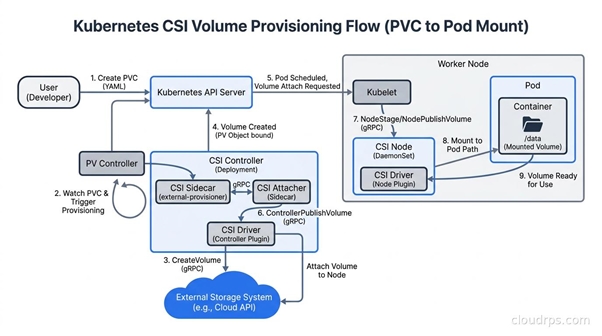
The cloud storage must be used in case Kubernetes requires to store information on behalf of the application. PersistentVolumeClaim shows that an application requires some storage resources. However, this operation does not mean that the cloud disk is prepared.
The CSI driver is responsible for integration of Kubernetes with cloud disks. The driver can create a disk, bind it to the worker node and prepare it to use with the pod.
Kubernetes permissions differ from cloud permissions. Kubernetes RBAC defines the capabilities for the component in the cluster, while cloud IAM defines the capabilities for the component in the cloud account.
Cloud Computing Coaching in Hyderabad can involve hands-on activities like IAM roles, service account, and cloud API error investigations. You will have the chance to observe the results of the missing permissions and how things change after they are added back.
How to Find These Problems
If the cloud resource does not operate as expected, do not repeatedly modify the YAML file without examining the errors.
Steps to be taken:
● kubectl describe pod or kubectl describe service
● Look at events to locate any error messages
● Examine the controller and/or storage driver logs
● Examine the cloud account's permissions
● Access the cloud console and examine the resource's status
Additionally, a Cloud Computing Course must include knowledge on cloud API limits. Too many API requests made in a short amount of time may be slowed or rejected by the cloud provider. This may result in delays regardless of whether Kubernetes is operating correctly.
Conclusion
Kubernetes and cloud services are interrelated behind the scenes. There are controllers, network plugins, storage drivers, permissions, etc. Even the smallest problem with any of them can bring the operation of the application to a halt. The best method to discover where the problem lies is to check each of them one by one. Begin with Kubernetes events, then logs and finally, cloud resources. When learners become familiar with all the interrelated components, it will be easier for them to handle issues with cloud applications.