
A design may consist of hundreds of buttons, text fields, cards, and many other components. Aligning everything consistently will require considerable effort. In case the designer wants to adjust the color or spacing, they will need to update each of the components manually. This is when Figma Variables come in handy. All the people who learn about Figma through a Figma Course can benefit from variables.
Key Points
● Variables store values that can be reused.
● Collections assist with organizing variables into groups.
● Modes provide an opportunity to use different values for various themes.
● Aliases relate variables together.
● Proper naming makes it easier to locate variables.
● Testing allows finding design errors before publishing the product.
How Figma Variables Work?
Variables contain values that the designer can use in other places. They can contain colours, numbers, texts or values which are true or false.
For example, there is a website with 20 buttons which have the same blue colour. Without variables, it could be necessary to change the colour for each button separately. With variables, it is possible to link all these buttons to one saved colour value.
Any change in that value would cause automatic change in the colour of the linked buttons. Any button that has some fixed colour will keep that colour until it is changed.
It is very helpful in cases when a website consists of many pages. It is also helpful in cases when a team must make some changes without visiting each screen individually.
Keep Variables in Collections
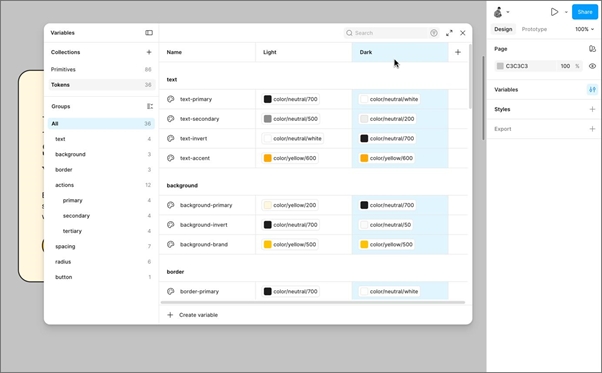
The variable collection is where the related variables are grouped. This will help designers maintain order in their design systems.
For instance, a designer may have a collection of colors, spacing, typography, and buttons. It becomes easy to identify the correct value during the design process of a big project.
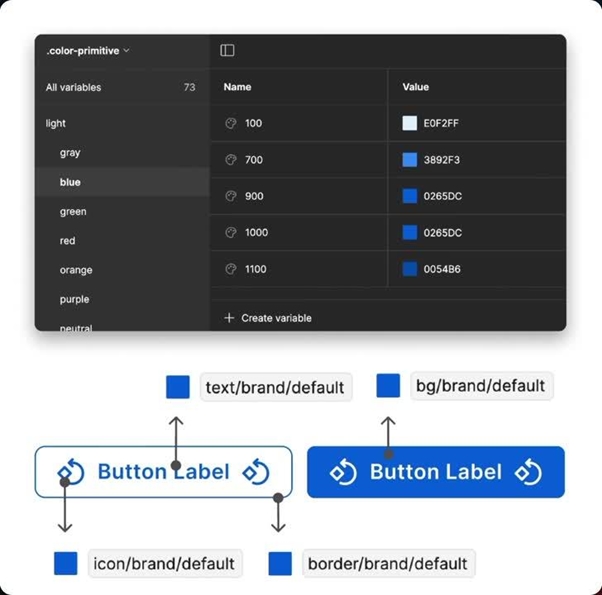
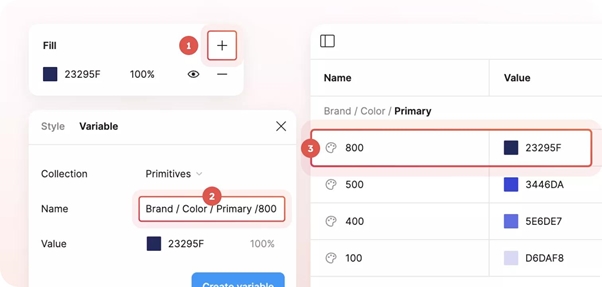
The names of the variables also play an important role in designing. Names such as blue-2-final become meaningless over time. The variable with a name like color/brand/primary informs the designer on how the value is being used.
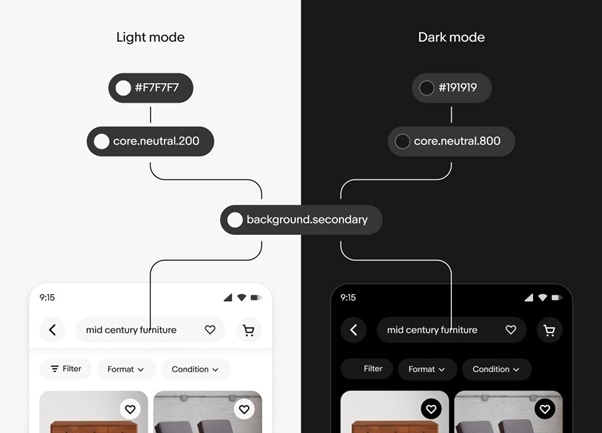
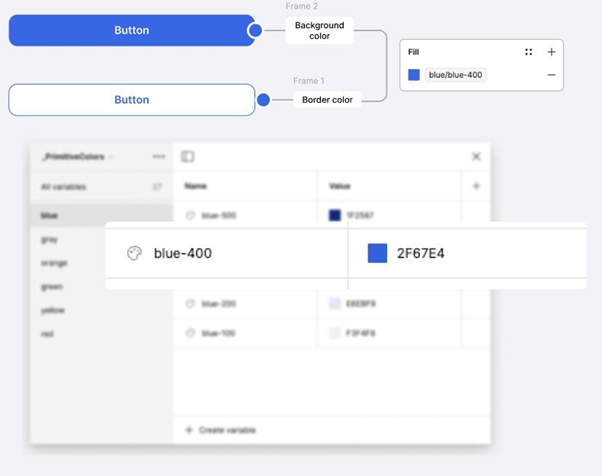
The designer may also group basic values and variables with descriptions. For example, the value blue/700 holds the color while the variable button/primary/background references the color. Students preparing for Figma Certification can use this kind of project to practise variable collections, modes, aliases, and design checks.
Use Modes for Light and Dark Themes
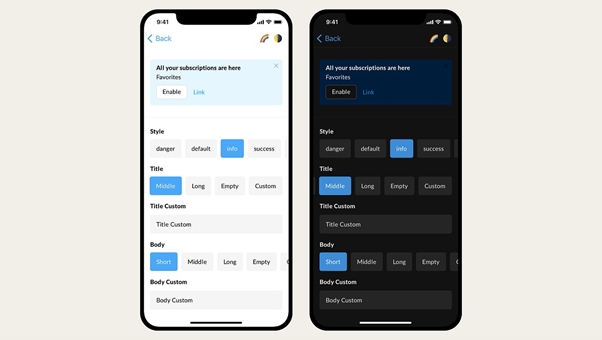
Mode allows one particular variable to assume varying values for different purposes. The name of the variable will remain constant, but it will adopt different values with the change in the mode selection.
An example of such a scenario is that of a website having light mode and dark mode. The background of the page will adopt a white value for light mode and a dark gray value for dark mode.
Different Types of Variables
Figma supports different variable types.
Variable type | What it can do |
Colour | Store colours for text, backgrounds, and borders |
Number | Store values such as spacing and sizes |
String | Store text that may change |
Boolean | Store a true-or-false value for supported uses |
Timing | Store time values used in supported motion settings |
Easing | Store motion curves for supported animation settings |
It should be noted that not all types of variables work well for all properties of design. Thus, a numerical variable may set a spacing property if it is supported, but it cannot be used as a text value.
How Aliases Help with Changes?
Aliases are variables that refer to another variable. This allows the designer to handle the values without having to keep storing the same value repeatedly.
For instance, the designer could create a surface/action variable that holds the color value of the primary button. The primary button background would then be able to use that variable. In the case where the team decides to change the primary action color, they would simply need to edit the shared value and not each individual button.
Change Designs Without Creating More Work
Before modifying the variable, the designers must be aware of where it is utilized. The color can be used in buttons, cards, headings, and many other elements of the website.
Please follow the guidelines below:
● Find the variable that needs to be modified.
● Find out the design components where it is used.
● Modify its value and see the effect.
● Test the important screens and button states.
● Ensure that text is readable.
● Make all spacing and color corrections before submitting the design.
This process becomes necessary when lots of people work on one single project. Even one little change can impact several screens, and it becomes crucial to verify the outcome. Going through this process in a UI UX Online Course will enable students to understand this practice in the real world.
Potential Mistakes that May Lead to Issues
While variables are convenient and useful, they may cause problems in case of improper design.
Some of the most frequent mistakes include:
- Inaccurate names: It may happen that designers do not understand what the variable controls.
- Fixed values: Some of the elements do not change since they are not linked to the variable.
- Blurring the boundaries: For example, a warning color should not be applied to objects unrelated to the variable without some explanation.
- Lack of consideration of Dark mode: The text becomes unreadable in this mode.
- Testing is skipped: One change may seem to be working well on one page but create issues on another.
It is necessary to remember the difference between local variables and library updates. The libraries should be checked and published with care to let other files use the changes.
Conclusion
Variables in Figma assist designers in making changes without going through individual items. It will save time and will also ensure consistency of colors, spacing, and other values across designs. Collections will organize the values, whereas modes will help in managing various themes. Aliases will also be helpful in making shared changes. However, designers will have to name the variables correctly and check their work each time they make significant changes.