
Every time you log into your bank account, complete a UPI payment, or sign up for a new app, one small thing happens in the background that most of us never think about — a business somewhere sends OTP to your mobile number, in under ten seconds, without a single wrong delivery. It feels automatic. It isn’t. Behind that one code lies a whole system of APIs, telecom routing, and compliance rules working together.
If you’re here because you want to understand how to send OTP to mobile number online — whether you’re a curious user or a business owner trying to add OTP verification to your own website or app — this guide covers both. We’ll explain why you can’t simply “send” an OTP to any number yourself, and then walk through exactly how businesses in India send OTP to mobile numbers online through SMS, WhatsApp, and voice calls, along with the compliance rules that make it work reliably here.
What Does “Sending an OTP to a Mobile Number” Actually Mean?
An OTP, or One-Time Password, is a short numeric code — usually four to six digits — sent to a mobile number to confirm that the person taking an action (a login, a payment, a signup) genuinely owns that number. It’s called “one-time” because it expires within a few minutes and can’t be reused once verified.
OTPs exist because passwords alone don’t cut it anymore. People reuse passwords across sites, write them down, or lose them in data breaches. An OTP sent to a mobile number adds a second layer — proof that you’re physically holding the device tied to that account. That’s why almost every Indian bank, e-commerce platform, and fintech app leans on OTP verification for logins, transactions, and password resets.
So when someone searches for how to send OTP to mobile number online, there are really two different needs hiding in that phrase — one is personal curiosity, and the other is a genuine business requirement to verify users at scale. We’ll address both, but the second is where most of this guide focuses, since it’s the part that actually needs a real solution.
Read Also – SMS Verification: What It Is, How It Works, and How to Send Verification Codes
Can You Send an OTP to Any Mobile Number Yourself?
Not manually, no — and that’s intentional. There is no consumer tool where you type in someone’s number, hit send, and an OTP goes out. If that existed, spammers would flood random numbers with fake authentication codes within minutes, and the entire idea of a “one-time password” would fall apart.
OTPs are always triggered by an action on a specific platform. Your bank generates one when you try to log in from a new device. An e-commerce site generates one at checkout. WhatsApp generates one when you activate your account on a new phone. The service is always the sender — you’re the receiver.
If you just want to test how OTP delivery works on your own number, you don’t need any special tool. Sign up for a new account, log out and log back into an existing one, or trigger a “forgot password” flow — any of these will send you a live OTP within seconds, at no cost.
But if you’re a business that needs to send OTP to your users’ mobile numbers reliably — hundreds or thousands of them, every day, across India — manual methods obviously don’t scale. That’s where an OTP sending service, delivered through an API, comes in. The rest of this guide is about exactly that.
How Businesses Send OTP to Mobile Number Online: Step by Step
Sending OTP to a mobile number online, from a business’s side, follows a fairly standard sequence regardless of which provider you use. Here’s how it actually works.
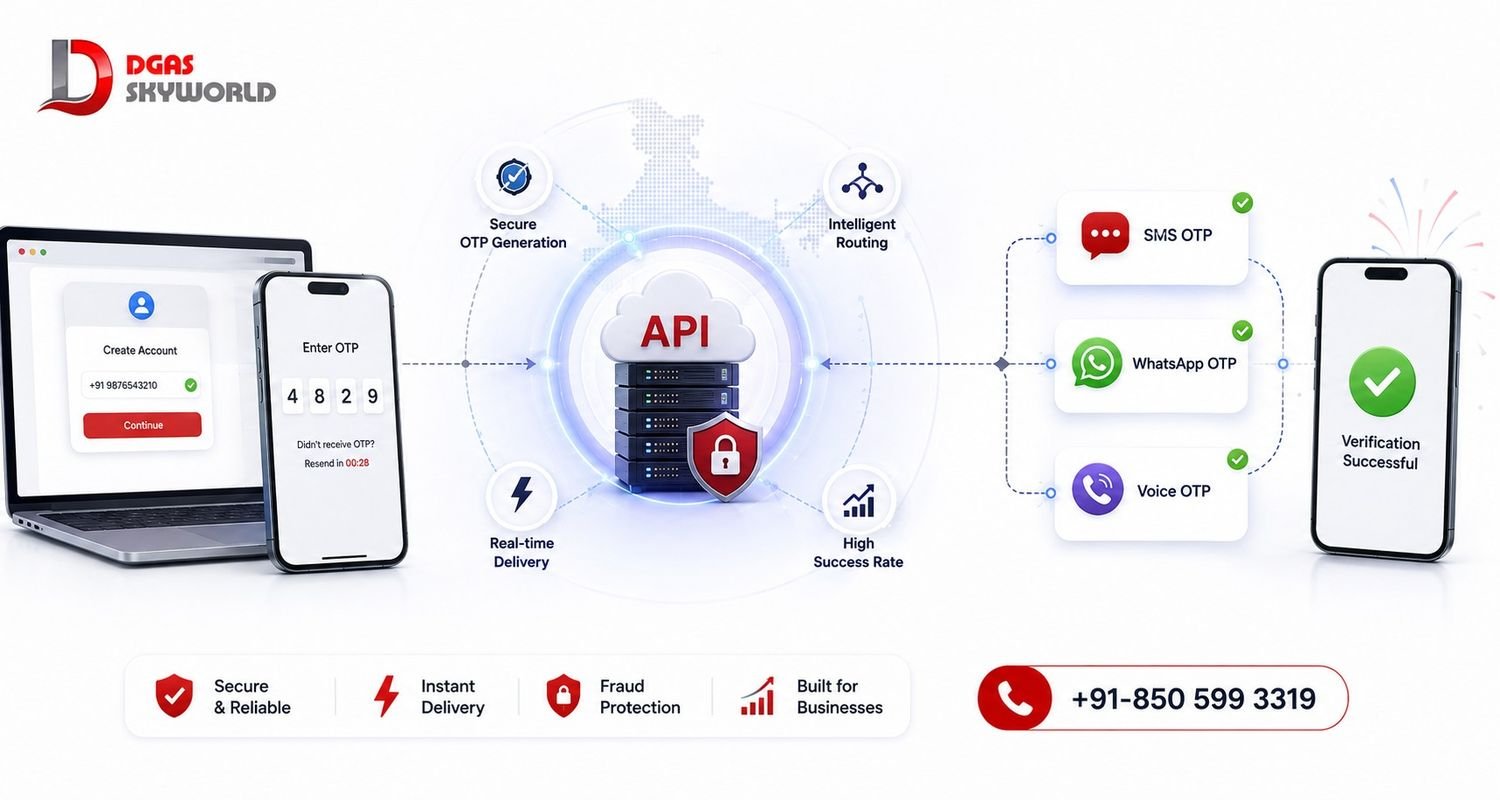
Step 1: Collect and Validate the Mobile Number
Everything starts with a clean input field — the user enters their number on your signup, login, or checkout page. Basic validation (correct length, valid country code, no obvious typos) at this stage saves you from wasting an OTP send on a number that was never going to receive it.
Step 2: Generate a Secure, Random OTP
Once the number is captured, your system (or your OTP API provider’s system) generates a random numeric code — typically 4 to 6 digits for consumer apps, sometimes longer for high-security banking flows. The code should be unpredictable, tied to that specific session, and set to expire automatically, usually within 60 to 300 seconds.
Step 3: Choose the Delivery Channel
This is the decision that affects delivery success the most: do you send OTP via SMS, WhatsApp, or a voice call? Each has trade-offs, which we’ll cover in detail in the next section. Many businesses today don’t pick just one — they let a single platform decide the best channel automatically.
Step 4: Send the OTP Through an API
Your application calls the OTP API’s “send” endpoint with the mobile number and channel preference, and the provider routes the code through the relevant telecom or messaging network. A typical send request looks something like this — simplified for illustration:
POST /otp/send
{
  "mobile": "+919XXXXXXXXX",
  "channel": "sms",
  "otp_length": 6,
  "expiry_seconds": 180
}
The provider returns a transaction ID, and the user should see the code arrive on their phone within a few seconds.
Step 5: Verify the OTP the User Enters
The user types the code back into your app, and your system calls the “verify” endpoint with the transaction ID and the entered code. If it matches and hasn’t expired, verification succeeds and the user proceeds.
Step 6: Set Expiry, Retry Limits, and Resend Cooldowns
This step is where a lot of DIY implementations fall short. Without a resend cooldown (usually 30 to 60 seconds) and a cap on verification attempts (typically 3 to 5 tries), your OTP flow becomes an open door for abuse — bots hammering the resend button to run up your SMS costs, or attackers brute-forcing a 4-digit code. A well-built OTP sending service handles this rate-limiting for you by default.
Put together, this is the real answer to “how to send OTP to mobile number online” from a business’s perspective — not a single click, but a small, secure pipeline that most companies build once through an API and never think about again.
Read Also – 17 Reasons Why Text Message Failed to Send And How to Actually Fix Each One
Which Channel Should You Use to Send OTP Online — SMS, WhatsApp, or Voice?
Once your OTP pipeline is built, the real question is which channel delivers it best. In India, you have three practical options, and each earns its place for a different reason.
SMS OTP remains the default and the most universal. It works on every phone — smartphone or basic feature phone — with zero app installation required, which is why banks and fintech apps still lean on it as their primary channel.
WhatsApp OTP has grown fast because of how people actually use their phones. India has over 15 million businesses running WhatsApp Business accounts today, the largest number of any country in the world, and WhatsApp messages routinely see open rates in the 95–98% range — noticeably higher than plain SMS in many segments. A WhatsApp OTP also arrives with your verified business name attached, which builds a bit more trust than an anonymous sender ID.
Voice OTP plays a smaller but important role — as a fallback for users whose SMS gets delayed by network congestion, or for accessibility cases where a spoken code is easier to act on than a typed one.
The mistake most businesses make is picking one channel and sticking with it forever. If your only route is SMS and a carrier filters it during peak hours, that OTP — and possibly that user’s signup — is gone. This is exactly where an omnichannel CPaaS platform earns its value for sending OTP to mobile numbers online. Instead of integrating three separate vendors for SMS, WhatsApp, and voice, a single CPaaS provider gives you:
One unified API instead of three separate integrations to maintain
Automatic failover — if the WhatsApp OTP doesn’t deliver in a few seconds, the system falls back to SMS or voice without any manual intervention
Higher overall OTP completion rates, since a failed delivery on one channel doesn’t mean a lost user
A single dashboard for delivery analytics across every channel, instead of checking three different provider portals
One compliance layer covering DLT registration for SMS and WhatsApp template approval, instead of managing two separate regulatory relationships
For a fuller picture of how this kind of unified platform works, see our detailed breakdown of what a CPaaS platform actually is and how it’s used in India.
OTP Delivery in Numbers: What the Data Actually Shows
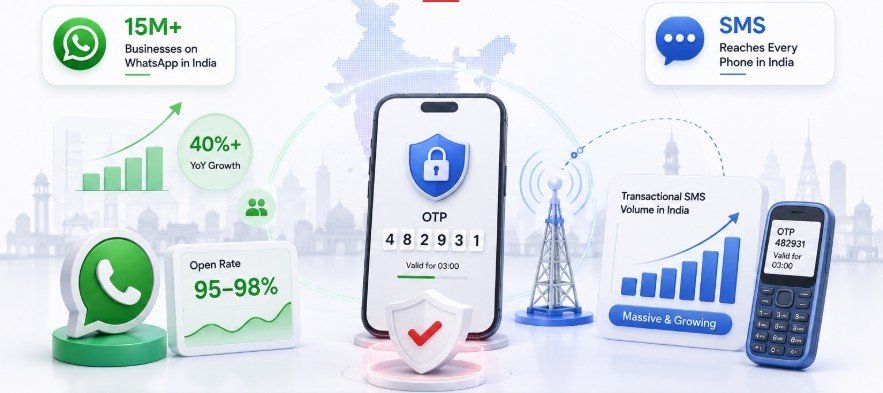
A few data points are worth knowing before you decide how to send OTP to mobile numbers online for your own business.
India now has more than 15 million businesses running WhatsApp Business accounts — the largest such base of any country globally — and WhatsApp Business API adoption among Indian companies has been growing at over 40% year on year. That said, the majority of those businesses are still on the free WhatsApp Business app rather than the paid API, which means the gap between “we’re reachable on WhatsApp” and “we run reliable, automated OTP delivery on WhatsApp” is still wide open for most companies. WhatsApp messages, meanwhile, continue to see open rates in the 95–98% range, well above what email or unread SMS notifications typically achieve.
On the SMS side, India’s transactional SMS volume — the category OTPs fall under — remains enormous simply because SMS is the one channel that reaches every phone, smartphone or not, with no app or internet connection required at the receiving end. That universal reach is exactly why most serious OTP setups in India don’t choose between SMS and WhatsApp — they run both, with one acting as a safety net for the other.
Why DLT Registration Matters When You Send OTP to a Mobile Number in India
This is the part most global guides skip entirely, and it’s the one that actually determines whether your OTPs get delivered in India at all.
The Telecom Regulatory Authority of India (TRAI) requires every business sending commercial SMS — including OTPs — to register on the DLT (Distributed Ledger Technology) platform. Your sender ID and message templates both need to be pre-approved. Without this registration, Indian carriers are legally required to block the message, no matter how good your OTP API provider otherwise is.
The one advantage OTP messages have here is that they fall under the “transactional” SMS category, which means they can reach users even if their number is registered on the DND (Do Not Disturb) list — something promotional SMS simply cannot do. But that exemption only applies if your template and sender ID are properly DLT-registered in the first place. We’ve covered this distinction in more depth in our guide on transactional SMS and how DLT compliance actually works.
If you’re evaluating providers to send OTP to mobile numbers online, this should be one of your first questions: is the DLT registration handled for you, or is it something you’re expected to figure out yourself?
OTP API Integration — What It Actually Takes to Get Started
For a developer, a basic OTP integration (send plus verify) is genuinely quick — often a matter of hours, not days, once you have API credentials. Adding retry logic, multi-channel fallback between SMS and WhatsApp, and proper rate-limiting adds a bit more time, but a full production-ready setup with monitoring and analytics is usually a project measured in days, not weeks.
Most OTP API providers support the common stacks — PHP, Node.js, Python, Java, and others — with SDKs or straightforward REST documentation, so you’re rarely starting from a blank page. The bigger time investment is usually less about the code and more about getting delivery right: choosing sender routes that don’t get filtered, registering your DLT templates correctly the first time, and setting sensible expiry and retry rules so genuine users aren’t locked out by their own security features.
DGAS Skyworld — A Trusted Partner to Send OTP to Mobile Number Online in India
If you’re evaluating who to trust with something as security-critical as OTP delivery, track record matters more than marketing copy. DGAS Skyworld has been building communication infrastructure for Indian businesses since 2017, and today operates as an omnichannel CPaaS platform covering SMS API, WhatsApp Business API, Enterprise Voice, RCS Messaging, Truecaller Messaging, AI Chatbots, and Email API — all built specifically for the Indian market, since that’s the only market DGAS Skyworld serves.
That focus shows up in the client list. DGAS Skyworld has worked with government bodies and public sector organizations including Delhi Nagar Nigam, Agra Nagar Nigam, Gujarat Council on Science and Technology, Punjabi University Patiala, and the Indian Institute of Foreign Trade — with 10+ government and PSU projects delivered to date. That’s a distinction that speaks louder than any claim a vendor can make about itself. Alongside these, DGAS Skyworld is also trusted by private enterprises across healthcare, banking, e-commerce, real estate, education, logistics, and retail.
On the delivery side, DGAS Skyworld routes OTP messages through direct operator connections with Jio, Airtel, BSNL, and Vi, aiming for delivery within seconds rather than the delayed, filtered delivery that grey-route providers are prone to. Every SMS route is fully DLT-registered and TRAI-compliant, so you don’t have to manage that layer separately. And because DGAS Skyworld runs SMS, WhatsApp OTP, and Voice OTP on one platform, you get the automatic-failover advantage we discussed above — without stitching together three different vendor relationships yourself.
If you’re comparing dedicated OTP providers specifically, our team has also published a detailed breakdown of the best OTP SMS service providers in India, and a deeper look at WhatsApp OTP verification as a standalone channel if that’s the route you’re leaning toward.
Book a free demo or call the DGAS Skyworld sales team at +91-850 599 3319 to see how OTP delivery performs on your own number before committing to anything.
Common Mistakes When Sending OTP to a Mobile Number Online
A handful of mistakes show up again and again in OTP implementations, and most are easy to avoid once you know to look for them.
Relying on a single channel. SMS-only setups with no WhatsApp or voice fallback lose users the moment one carrier route has a bad day.
OTPs that are too long or never expire. Four to six digits is the standard for a reason — longer codes frustrate users, and codes with no expiry are a security risk.
No resend cooldown or attempt limit. Without rate-limiting, your OTP flow is an open invitation for SMS-pumping fraud and brute-force attempts.
Skipping DLT registration. In India, this isn’t optional — an unregistered sender ID simply won’t get through, regardless of how good the rest of your integration is.
Mixing promotional content into an OTP template. Meta and TRAI both require authentication messages to stay strictly transactional — no offers, no branding pitches, inside the OTP text itself.
Frequently Asked Questions
How can I send an OTP to a mobile number online?
As an individual, you can’t send yourself an OTP on demand — it’s triggered by a login, signup, or transaction on a service you’re already using. As a business, you send OTP to mobile numbers online through an OTP API that handles generation, delivery via SMS/WhatsApp/voice, and verification.
Can I send OTP SMS for free?
Most OTP API providers, including DGAS Skyworld, offer trial credits so you can test delivery before committing to a paid plan. Ongoing free, unlimited OTP sending to arbitrary numbers doesn’t exist legitimately — carrier routing and DLT compliance both carry real costs.
Is WhatsApp OTP better than SMS OTP in India?
Neither is strictly “better” — they serve different purposes. WhatsApp OTP tends to see higher open rates and a more branded delivery experience, while SMS OTP has universal reach across every phone, including feature phones with no internet access. The strongest setups use both, with automatic failover between them.
Do I need DLT registration to send OTP SMS in India?
Yes. TRAI requires every business sending commercial SMS, including OTPs, to register their sender ID and templates on the DLT platform. Without it, Indian carriers will block the message.
How fast should an OTP be delivered?
Ideally within a few seconds. Delivery delays past 10–15 seconds noticeably increase drop-off, since users tend to abandon the verification step or request a resend, which adds cost and friction.
What is the best OTP service provider in India?
It depends on your scale, channels, and compliance needs — we’ve compared several providers in detail in our best OTP SMS service provider in India guide. For businesses that want SMS, WhatsApp, and Voice OTP on one DLT-compliant, India-only platform with a proven government and enterprise track record, DGAS Skyworld is worth evaluating directly.
Can OTP be sent to a number registered on DND?
Yes. OTPs fall under the transactional SMS category in India, which is exempt from DND blocking — but only when the sender ID and template are properly DLT-registered.
Final Thoughts
Sending OTP to a mobile number online isn’t a single button — it’s a small but critical piece of infrastructure that touches security, compliance, and user trust all at once. For individuals, it’s worth knowing you’ll never see a legitimate “send OTP” tool because that would break the very security model OTPs exist to protect. For businesses, the real work is choosing a provider that gets DLT compliance right, supports more than one delivery channel, and has a track record you can actually verify.
DGAS Skyworld has spent since 2017 building exactly that — an omnichannel CPaaS platform trusted by government bodies, PSUs, and private enterprises across India to send OTP to mobile numbers reliably, every time.
Ready to see it in action? Book a free demo, explore the SMS API and WhatsApp Business API pages, or get in touch with our team to discuss your OTP delivery needs.