You can run into all kinds of problems when you try to get your email archives from open-source email clients into Microsoft Outlook. You might encounter issues such as missing attachments, broken folder structures, or file size limitations when converting MBOX to MSG format for entire mailboxes moved from Mozilla Thunderbird, Apple Mail, or Eudora.
This troubleshooting playbook offers a complete guide to fixing MBOX to MSG conversion errors with manual workarounds and an automated solution by WholeClear MBOX to MSG Converter.
File format details: “MBOX and MSG”
To understand why migration errors occur, you need to know how each file format stores email data.
MBOX (Mailbox Format): An open-source, cross-platform, email client-supported versatile container format. The MBOX file is one big text file containing all the emails (attachments and headers) of one folder in one big pile.
MSG (Outlook Message Format): Native email file format for Microsoft Outlook. An MSG file contains all the data that composes an individual email message, including body text, hyperlinks, inline images, metadata (To, From, Date, Subject), and embedded attachments.
MSG stores each email as a separate file, while the MBOX format stores hundreds or thousands of emails in one big file. If you want to convert MBOX to MSG, you have to extract each email from the single large Container into Separate MSG Files for each email.
Advantages of MBOX to MSG Conversion
Move to Microsoft Outlook: Outlook is the default corporate email program. Change file type: If you are migrating from clients like Thunderbird or Apple Mail to Outlook, you will need to convert file formats to make them compatible.
Granular Email Archiving: Granular archiving of specific MSG files makes it easier to search, archive, share, or attach them rather than share or open a full mailbox database.
Legal Compliance & Auditing: Legal and compliance teams usually don’t want a multi-gigabyte MBOX file; they want individual emails.
Platform and Client Migration: In many organisations, migration from macOS or Linux to Windows-based enterprise systems requires legacy MBOX archives to be converted to Outlook-compatible formats.
What is the major problem with MBOX to MSG Converter?
The fundamental problem is a structural misfit:
Data Structure Mismatch: Proper analysis of the large MBOX file (multi-GB) and its conversion into thousands of individual MSG files. Even a single corrupt line or a broken header tag in the MBOX file can bring the entire conversion process to a grinding halt.
Attachment Detachment: MBOX files store attachments as raw text in the body of the message using MIME encoding. Conversion errors often result in loss of attachments or attachments becoming unreadable.
Formatting Corruption: HTML formatting, inline images, and non-ASCII character sets (such as international fonts) often get corrupted during manual conversion or when using underpowered software.
Header Loss: Conversion of an e-mail can easily lead to the loss of critical metadata such as original timestamps, read/unread status, and routing information.
How to Convert MBOX to MSG Conversion
If you have any problems with the conversion, you can do a manual workaround or use an automatic converter.
Solution 1:The Manual Conversion
Manual conversion is typically performed with the help of Mozilla Thunderbird and add-ons (like ImportExportTools NG) to bridge the gap between MBOX and Outlook formats.
How to Do the Manual Process
Open Mozilla Thunderbird and install an add-on like ImportExportTools NG to be able to import your MBOX file.
Select the emails that you imported in Thunderbird.
Drag the emails you’ve collected onto your desktop or local folder. This will save the emails as separate EML files.
Launch Microsoft Outlook.
Drag and drop those EML files to an Outlook folder.
Open up each email manually in Outlook and do a Save As (File>Save As), and save each message as an MSG file.
Manual conversion: disadvantages
Repetitive & Time Consuming: Manually converting large mailboxes to MSG format is very time-consuming.
Metadata may be lost: Drag and drop could lose the original email creation dates and replace them with the date of the current file import.
Folder Hierarchy Collapse: Drag and drop by hand does not preserve the subfolder structure, and all emails are mixed into a single folder.
Big Mailbox & High Failure Rate: Dragging and dropping thousands of emails at once may cause modern email clients and operating systems to freeze up and crash.
Installation of Multiple Tools: You will be required to install & set up Thunderbird, third-party add-ons, and Microsoft Outlook on the same machine.
Solution 2: Software Solution - Automation
The best way to make sure that all conversion errors are corrected, data integrity is 100%, and that there are no complicated manual steps is with an automated software tool.
MBOX to MSG Converter by WholeClear
WholeClear MBOX to MSG Converter is the best software to convert MBOX files into MSG format. It helps to convert multiple MBOX files to MSG format at a time.
Summary of Software
The software can read the basic structure of MBOX files created by more than 30 email clients natively. It divides the MBOX data stream into individual, healthy MSG files ready for Microsoft Outlook. You don’t have to have Outlook installed on your computer.
MBOX to MSG Converter WholeClear – Key Features
Batch MBOX to MSG Converter: Import multiple MBOX files and perform bulk conversion, eliminating the need to convert files individually.
Preserves folder structure: Keeps the original folder and subfolder structure while migrating.
Supports 30+ MBOX Email Clients: Supports MBOX, MBX, and MBS files created by Thunderbird, Apple Mail, Eudora, PocoMail, Spicebird, SeaMonkey, Opera Mail, and more.
Attachments & Email Format Retention: Keeps all MIME attachments, embedded images, hyperlinks, rich-text formatting, and essential header data (To, From, CC, BCC, Subject, Date).
MS Outlook not Required: MS Outlook does not need to be installed on your PC for MBOX to MSG conversion.
Preview before Conversion: It offers a well-organised preview of all the emails and messages' contents before starting the conversion process to ensure the accuracy of data.
Custom Output Location: Allows you to choose any local drive, external hard drive, or network location to save your converted MSG files.
Unlimited File Size: open MBOX files of any size and size, no matter how big, without any fear of crashing or losing emails. The free demo version converts only 1st 25 emails per folder.
How to Convert MBOX to MSG? – 5 Step Solution
WholeClear has a simple 5-step conversion process.
1. Download & Install: Download WholeClear MBOX to MSG Converter on your PC and install it.
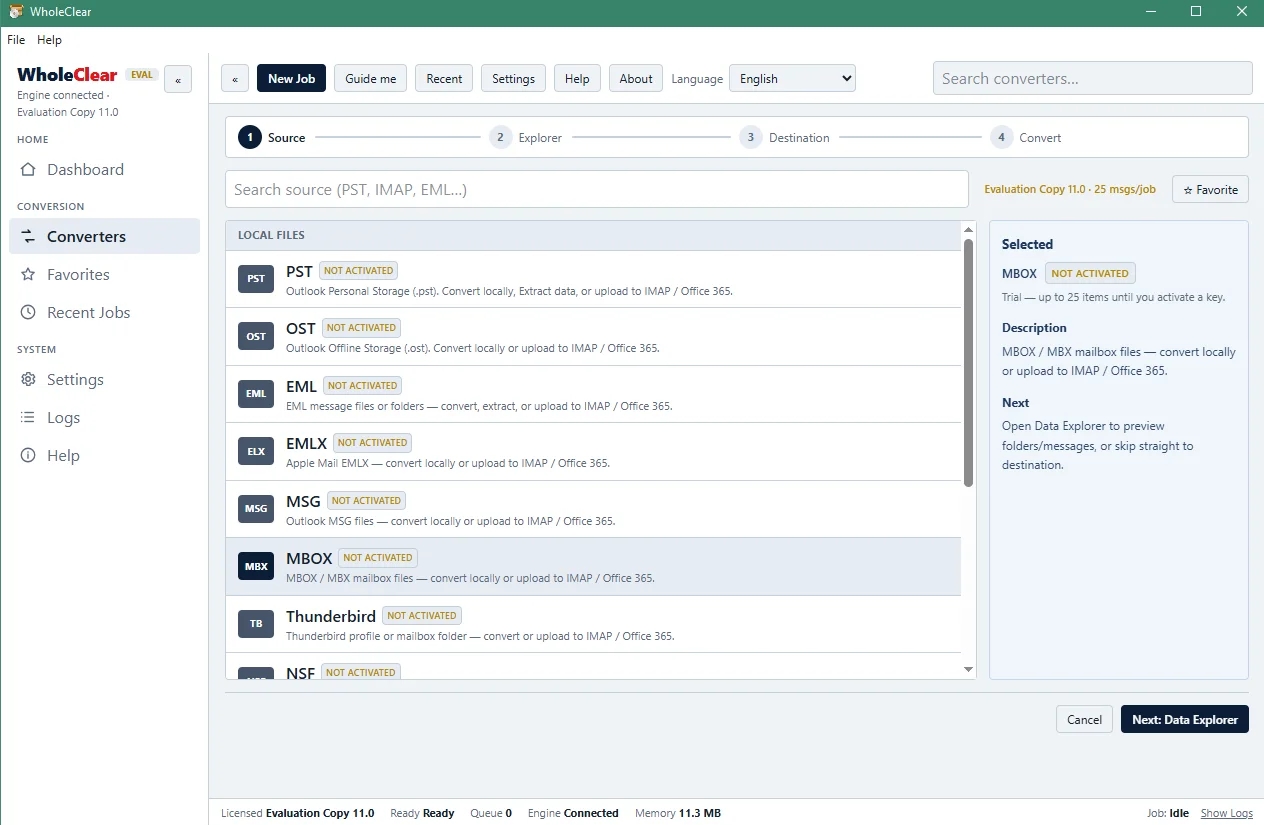
2. Import MBOX files: Click on the source selection button and choose Select File or Select Folder mode to import your MBOX file(s) to the application.
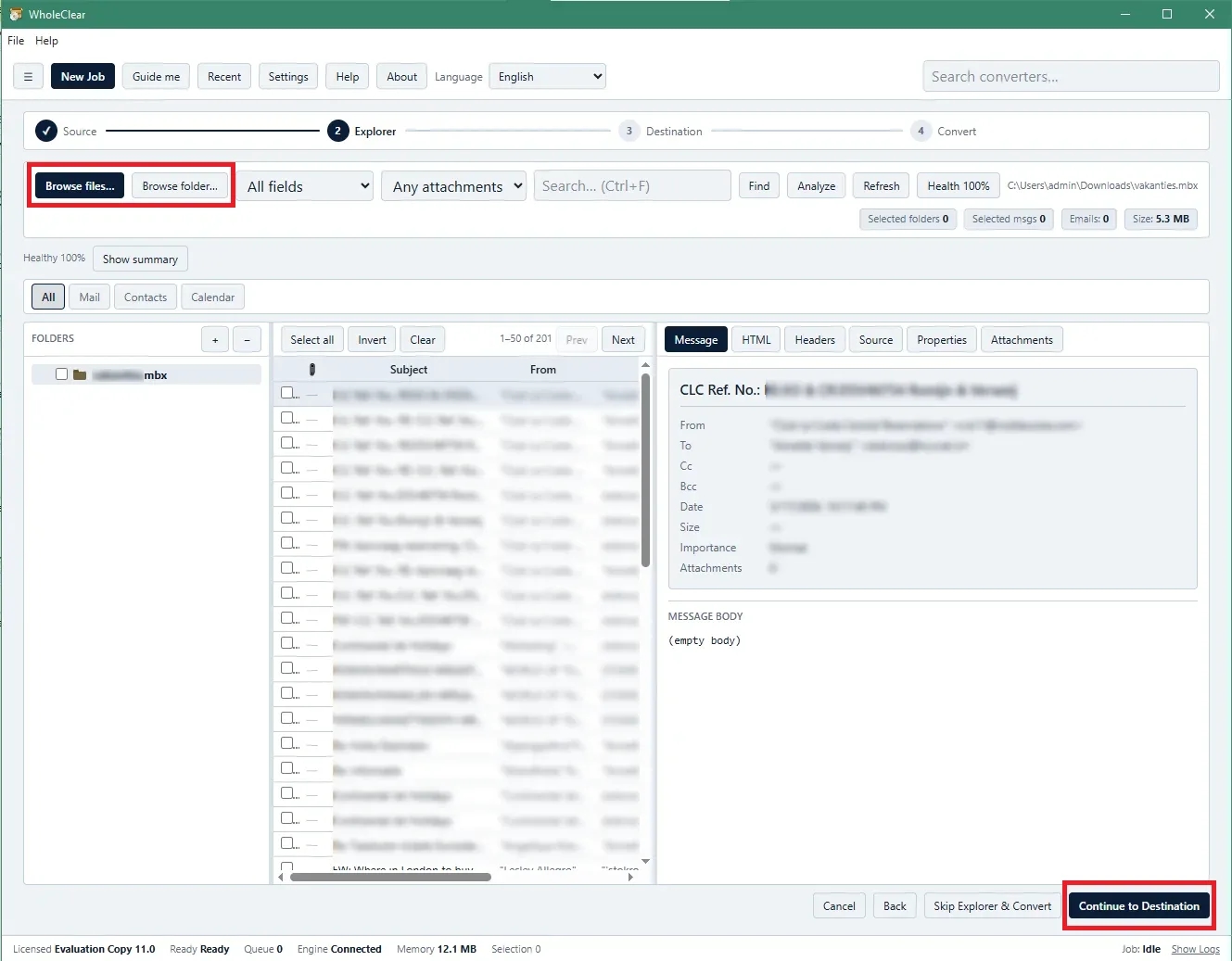
3. Preview Email Content: Verify that the MBOX mailbox hierarchy is loaded in the preview panel and all emails and attachments are reading correctly.
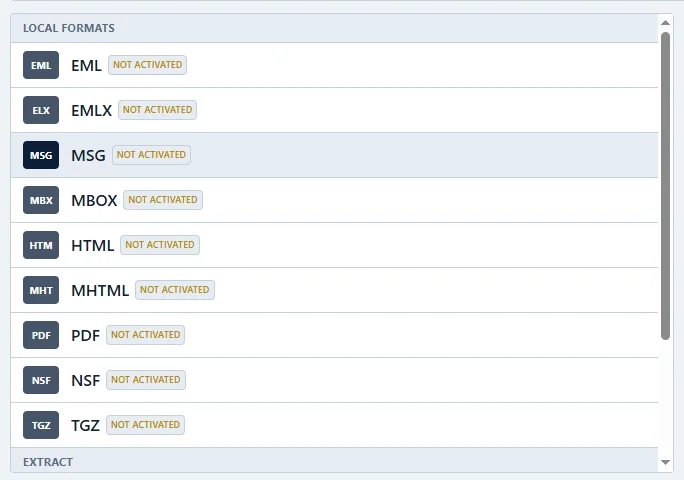
4. Select Destination Path: Click on the Browse button to select the folder to save the output MSG files.
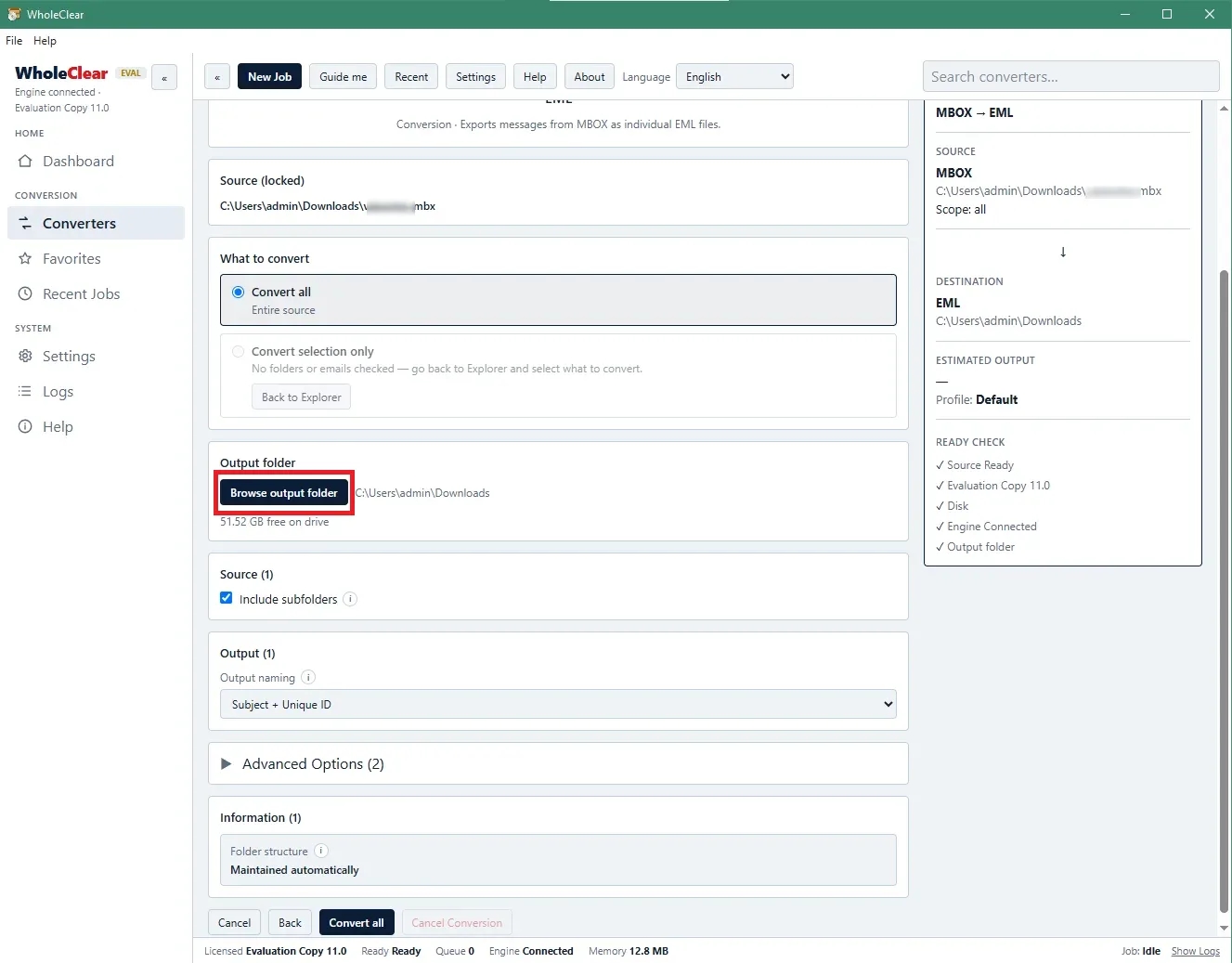
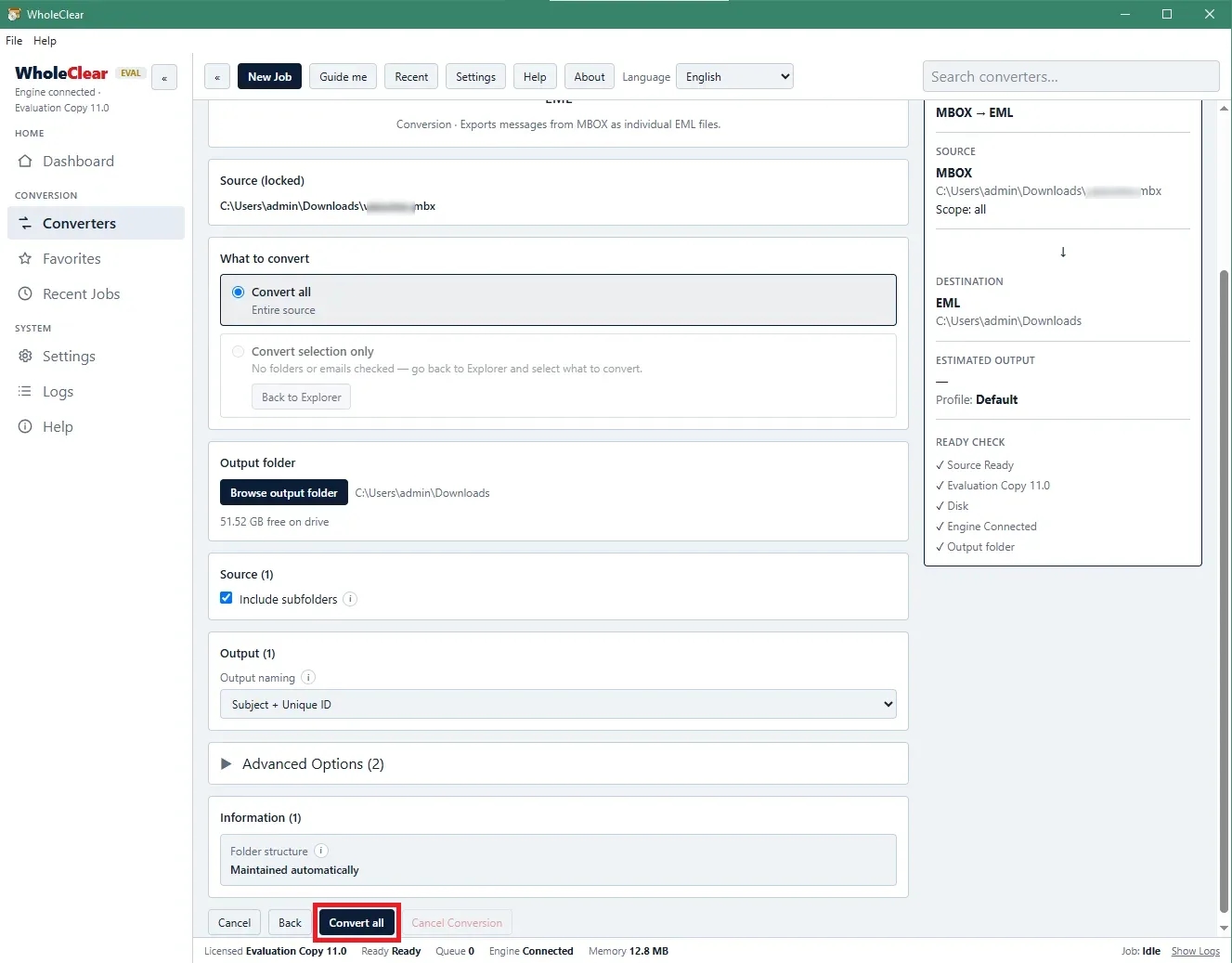
5. Convert Now: Click on the Convert Now button to start the MBOX to MSG conversion process. Once you’re done, you’ll get a confirmation pop-up letting you know your files are ready to go.
WholeClear – Advantages & Disadvantages
Advantages
User Interface: User-friendly wizard-driven interface makes it easy to use for non-technical users.
Outlook Independent: Convert files directly without installing Microsoft Outlook or other mail client plug-ins.
Mass Migration Prepared: Batch processing allows for fast, reliable migration of multi-gigabyte email archives.
Broad MBOX Compatibility: Handles MBOX files generated by 30+ platforms and operating systems efficiently.
Disadvantages
Windows-centric product details: While WholeClear does mention cross-platform support, its dedicated page for MBOX to MSG is very Windows-installation-centric, so it’s worth checking platform compatibility before you buy.
Demo Version Limitations: The trial version converts only 25 MBOX files from each folder. If you want to transfer the whole archive, you need a licensed key.
Not A Major File Recovery Tool: This is a migration tool, not a fixing tool. Highly corrupted or damaged MBOX files need to be repaired before you convert them.
Aim for a specific format: Only .msg files are output. If you want PST, EML, or PDF, WholeClear has bigger conversion suites.
Customer Ratings and Reviews:
“We were migrating the entire company from Mozilla Thunderbird to Microsoft Outlook, but the manual conversions would time out and corrupt our message timestamps. The MBOX database is 45 GB. The WholeClear MBOX to MSG Converter converted the entire database in one single batch. “The attachments are still there, and our sub-folder structure is intact.” We saved dozens of hours, thanks to our IT department.
IT Systems Administrator.
Conclusion & Call to Action
MBOX to MSG conversion errors are caused by mismatches in file structures, missing software dependencies, and complex manual workarounds. Manual methods work fine for a handful of emails, but fall flat on large archives or important email metadata.
You can get help from WholeClear MBOX to MSG Converter to get over these hurdles. The tool can convert directly and in batches and doesn't require Outlook. It keeps all the formatting and the attachments.
Want to correct your conversion errors?
Download Free Demo Version of WholeClear MBOX to MSG Converter Now & Test Your Conversion with Instant Preview!
Frequently asked questions
1. Do I need Microsoft Outlook for PC to do MBOX to MSG conversion?
No, the WholeClear MBOX to MSG Converter is an independent application. It provides full compatibility with Outlook MSG files without installing Microsoft Outlook on your system.
2. Is it safe to open MBOX to MSG converted emails' attachments?
Yes, the software keeps all original attachments (documents, images, PDFs, zip files) with the respective emails during the conversion process without changing the content and formatting of the files.
3. Does the free trial version of WholeClear software have any limitations?
Try all the features of the software and see your data with the free trial version. But the real files can be saved only for the first 25 MBOX files in the folder. Download the licensed version to remove the conversion limit.
4. Can this tool convert MBOX files generated from Apple Mail for Windows?
WholeClear software can convert MBOX files exported from Apple Mail (Mac Mail) to MSG files without any compatibility issues, so you can transfer them to a Windows system.


