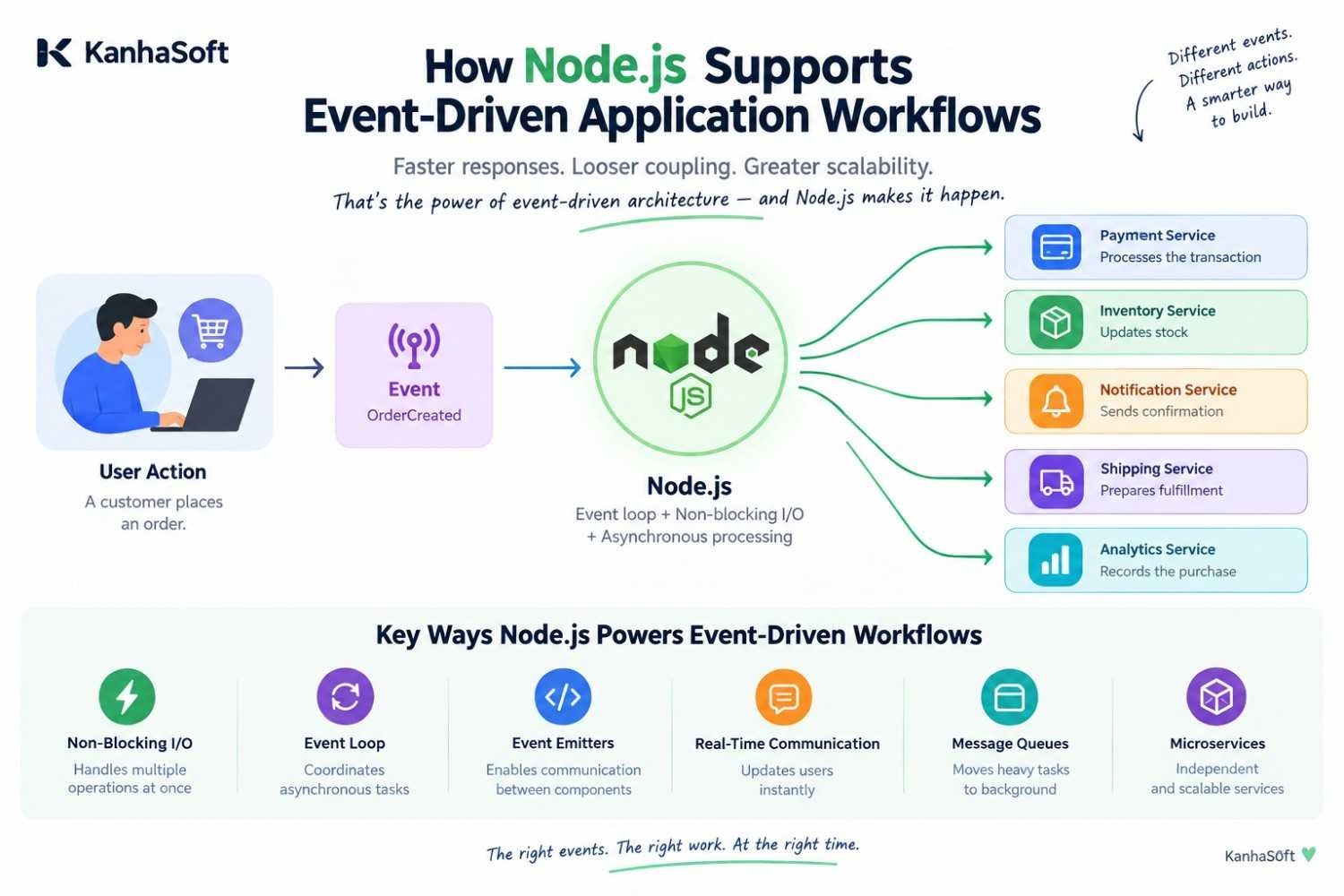
A customer places an order. A payment needs to be processed. Inventory needs to be updated. An email needs to be sent. A notification may need to appear. Somewhere in the background, analytics data is also being collected.
If every task waits politely for the previous task to finish, the application can quickly become slower and harder to manage.
This is where event-driven application workflows become useful.
Node.js is particularly well suited to this approach because its asynchronous, non-blocking architecture allows applications to respond to events while continuing to handle other work. Instead of forcing every operation into one long queue, we can design the system so that specific events trigger specific actions.
So, how does Node.js support event-driven application workflows?
Let's explore how the Node.js event loop, asynchronous processing, event emitters, queues, real-time communication, and microservices work together to create responsive and scalable applications.
What Is an Event-Driven Application Workflow?
An event-driven application workflow is an approach where an event triggers one or more actions.
An event could be almost anything meaningful to an application:
A user creates an account.
A customer places an order.
A payment is completed.
A file is uploaded.
A message is received.
Inventory falls below a certain level.
A scheduled task is triggered.
Instead of making one large process responsible for everything, we can allow different parts of the application to react to these events.
For example, imagine an e-commerce application.
When a customer places an order, the system could generate an OrderCreated event. Different services can then respond to that event:
The inventory service updates stock.
The payment service processes the transaction.
The notification service sends a confirmation.
The shipping service prepares fulfillment.
The analytics system records the purchase.
The result is a workflow where different components can perform their responsibilities without unnecessarily waiting for unrelated tasks.
It sounds simple—and that is exactly the point. Good architecture should make complicated work feel less complicated.
Why Does Node.js Fit Event-Driven Workflows?
Node.js was designed around an event-driven, asynchronous programming model.
This makes it particularly useful for applications that spend considerable time waiting for external operations such as database queries, API responses, file operations, or network requests.
Instead of blocking the application while waiting, Node.js can continue processing other work and handle the result when the operation completes.
Three concepts are particularly important here.
1. Non-Blocking I/O
Input/output operations are everywhere in modern applications.
We communicate with databases, external APIs, file systems, payment gateways, cloud services, and other applications.
A blocking approach may cause the application to wait while one operation completes.
Node.js takes a different approach.
With non-blocking I/O, an operation can be initiated while Node.js continues handling other tasks. When the operation finishes, the application can process the result.
This becomes especially useful when an application handles many concurrent requests.
For example, if one customer is waiting for an external API response, Node.js does not necessarily need to sit there staring at the clock. Other requests can continue moving through the system.
That is one reason Node.js is commonly used for API-heavy and real-time applications.
2. The Node.js Event Loop
The event loop is one of the most important parts of the Node.js runtime.
In simple terms, it helps Node.js manage asynchronous operations without blocking the main execution flow.
Consider a simple workflow:
The application receives a request.
An asynchronous operation begins.
Node.js can continue processing other work.
The asynchronous operation completes.
The corresponding callback, promise continuation, or event handler is executed.
We do not need to turn this into a computer science examination.
The important idea is that Node.js can coordinate many I/O-related operations efficiently instead of forcing every task to happen one after another.
That makes the event loop a natural foundation for event-driven application workflows.
3. Event Emitters
Node.js also provides the EventEmitter mechanism for creating and handling events inside applications.
One component can emit an event, while another component listens for it.
For example:
An order is created.
The application emits an order event.
A listener receives the event.
The listener performs the required action.
This approach can reduce unnecessary dependencies between components.
Instead of one component knowing every detail about what happens next, it can simply announce that something happened.
The interested components can decide how they should respond.
How Node.js Supports Event-Driven Application Workflows
Node.js provides several mechanisms that can be combined to build event-driven workflows.
1. Asynchronous Task Processing
Asynchronous programming is central to Node.js.
Developers can use callbacks, Promises, and async/await to work with operations that may take time to complete.
For example, an application may need to:
Fetch customer data.
Call a payment API.
Store information in a database.
Send a notification.
These operations do not always need to block the entire application.
With asynchronous processing, we can design workflows where tasks are handled efficiently according to their dependencies.
However, asynchronous code still needs discipline.
Poorly structured asynchronous logic can become difficult to understand and maintain. Event-driven architecture is not a magic wand. Unfortunately, software architecture has not yet invented one.
Clear responsibilities, proper error handling, and understandable event flows remain important.
2. Real-Time Communication
Many applications need to react immediately when something changes.
Think about:
Chat applications
Live dashboards
Collaboration platforms
Notification systems
Tracking applications
Real-time monitoring tools
Node.js works well with real-time communication technologies such as WebSockets and Socket.IO.
For example, when a new message arrives, an event can trigger an update that is immediately delivered to connected users.
The application does not need to repeatedly ask, “Anything new yet?”
Instead, the system can react when something actually happens.
This event-based approach is especially useful when users expect information to update without manually refreshing the page.
3. Message Queues and Background Jobs
Not every task needs to happen while the customer is staring at a loading screen.
Some operations can be moved into background processing.
Examples include:
Sending emails
Generating reports
Processing images
Synchronizing data
Creating notifications
Running large data-processing tasks
Message queues can help separate these operations from the main user-facing workflow.
Technologies such as Redis-based queues, RabbitMQ, and Kafka can be used depending on the application's architecture and requirements.
For example, after an order is created, the application can publish an event. A background worker can then process email notifications separately.
This can help keep the main application responsive while longer-running work happens elsewhere.
4. Microservices Communication
Event-driven architecture can also support communication between microservices.
Consider an order-management platform with separate services for:
Orders
Payments
Inventory
Shipping
Notifications
The order service can publish an event when an order is created.
Other services can consume that event and perform their respective responsibilities.
This can reduce direct dependencies between services.
It also allows different components to evolve independently when the architecture is designed carefully.
Of course, distributed systems bring their own challenges. Event ordering, retries, duplicate messages, monitoring, and eventual consistency all need to be considered.
Breaking an application into 25 services does not automatically make it enterprise-ready. Sometimes it simply creates 25 places to look when something stops working.
5. External API and Service Integration
Modern business applications rarely operate alone.
They communicate with:
Payment gateways
CRM platforms
ERP systems
Shipping providers
Marketing platforms
Authentication services
Cloud platforms
Node.js's asynchronous model can help coordinate these integrations.
For example, when a payment provider confirms a transaction, the application can receive the result and trigger additional events.
The workflow could look like this:
Payment Completed → Order Updated → Inventory Updated → Notification Sent
Each step can have a clearly defined responsibility.
This makes complex integrations easier to organize compared with putting every operation into one giant function that eventually becomes everybody's favorite debugging problem.
A Practical Example: Event-Driven E-Commerce Workflow
Let's consider a simple e-commerce application.
A customer clicks Place Order.
The application receives the request and creates the order.
Instead of making the request responsible for every downstream task, it can publish an event such as OrderCreated.
The workflow may then continue like this:
Step 1: Order Creation
The order service stores the order and publishes the event.
Step 2: Payment Processing
The payment service receives the relevant event and processes the payment.
Step 3: Inventory Update
Once payment is confirmed, an event can trigger inventory processing.
Step 4: Notification
A notification service can receive the appropriate event and send an email or push notification.
Step 5: Shipping
The shipping system can receive the required information and begin fulfillment.
The customer does not necessarily need to wait for every background operation to finish before the application responds.
This separation can improve responsiveness while also making the architecture easier to extend.
Later, if the business wants to add a loyalty-points service, another event consumer may be introduced without completely rewriting the existing order workflow.
That is where event-driven architecture becomes particularly interesting.
Benefits of Using Node.js for Event-Driven Workflows
Better Application Responsiveness
Non-blocking I/O can help applications remain responsive while waiting for external operations.
This is valuable for API-driven applications and systems handling many concurrent connections.
Scalability
Event-driven systems can allow individual components or workers to scale according to workload.
For example, if notification processing suddenly increases, additional workers can potentially handle that workload without scaling every component of the application equally.
Loose Coupling
Events can reduce direct dependencies between components.
A producer does not necessarily need to know every consumer that will respond to an event.
This can make future changes easier when the event contracts are well designed.
Background Processing
Queues and workers allow resource-intensive or non-urgent tasks to happen outside the main request flow.
This can improve the user experience and help organize application workloads.
Easier Feature Expansion
New consumers can sometimes be added to existing events.
For example, an existing OrderCompleted event could eventually trigger:
Loyalty-point calculation
Customer analytics
Recommendation updates
Invoice generation
The existing order service does not necessarily need to know all of these details.
When Should Businesses Consider Node.js for Event-Driven Applications?
Node.js can be considered when an application involves substantial asynchronous or event-based activity.
Typical use cases include:
Real-time applications
SaaS platforms
E-commerce systems
API-driven applications
Notification platforms
Collaboration tools
Integration-heavy business applications
Microservice architectures
Data synchronization workflows
However, technology decisions should always consider the actual workload.
Node.js may be well suited to I/O-heavy workloads, but applications dominated by CPU-intensive processing may require a different approach or supporting services.
The goal is not to use Node.js simply because it is popular.
The goal is to choose an architecture that matches the problem.
Best Practices for Node.js Event-Driven Workflows
Create Clear Events
Event names should communicate what happened.
Names such as OrderCreated, PaymentCompleted, and UserRegistered are easier to understand than vague event names.
Keep Event Handlers Focused
An event handler should have a clear responsibility.
If one handler starts performing payment processing, inventory management, reporting, notifications, and perhaps making coffee, it is probably time for a redesign.
Handle Failures Properly
Events can fail.
Applications should consider:
Retries
Timeouts
Error logging
Dead-letter queues
Recovery mechanisms
Important events should not simply disappear because one downstream service had a bad morning.
Consider Idempotency
A message may occasionally be delivered more than once.
Critical operations should be designed so that processing the same event repeatedly does not create unintended results.
This is particularly important for payments, orders, and inventory updates.
Monitor the Workflow
Distributed event-driven systems need good observability.
Useful practices include:
Centralized logging
Metrics
Distributed tracing
Error monitoring
Queue monitoring
When one event triggers five services, debugging without proper observability can become surprisingly adventurous.
Define Event Contracts
Services should understand what information an event contains.
Clear event contracts help teams maintain compatibility as systems evolve.
Common Challenges in Event-Driven Node.js Applications
Event-driven architecture offers flexibility, but it also introduces complexity.
Debugging
A single user action may trigger multiple events across different services.
Without proper logging and tracing, finding the source of a problem can be difficult.
Event Ordering
Some workflows depend on events arriving in a particular order.
Architecture and messaging infrastructure should account for these requirements.
Duplicate Processing
Retries can result in duplicate messages.
Applications need suitable safeguards for important operations.
Data Consistency
Distributed systems may use eventual consistency.
Different services may not reflect a change at exactly the same moment.
Businesses need to understand these trade-offs before designing the workflow.
Operational Complexity
Event-driven systems can become complicated when too many events are introduced without clear boundaries.
The objective should be meaningful event-driven design—not turning every function call into an event just because we can.
How to Build a Maintainable Node.js Event Architecture
A maintainable architecture starts with clear boundaries.
We should define:
Which events matter to the business.
Which service produces each event.
Which services consume it.
What data the event contains.
What happens when processing fails.
How the workflow is monitored.
How duplicate events are handled.
Teams working on complex applications may also choose to hire a Node.js developer with experience in asynchronous programming, distributed systems, API integration, queues, and real-time applications.
For larger projects, dedicated developers can help maintain consistent development practices across multiple components and ongoing workflows.
The important part is matching development expertise to the complexity of the system rather than simply increasing the number of developers.
Is Event-Driven Architecture Always the Right Choice?
No architecture pattern is suitable for every application.
A small application with a straightforward workflow may not need queues, multiple event consumers, or a microservice architecture.
Adding unnecessary infrastructure can introduce more operational overhead than value.
Event-driven architecture becomes more relevant when applications have:
Multiple independent workflows
High volumes of asynchronous activity
Real-time requirements
Background processing
Multiple services reacting to business events
Complex external integrations
In other words, architecture should follow the application's needs.
Not the other way around.
Conclusion
Modern applications rarely have the luxury of doing one thing at a time.
Users expect fast responses. Businesses expect reliable integrations. Background processes need to keep moving. Real-time systems need to react immediately.
Node.js provides a strong foundation for handling these requirements through its event loop, non-blocking I/O, asynchronous programming model, event emitters, queues, and real-time communication capabilities.
But technology is only one part of the equation.
A successful event-driven application also needs thoughtful event design, clear responsibilities, reliable error handling, monitoring, and a practical approach to scalability.
The goal is not to make every operation asynchronous simply because Node.js allows it.
The goal is to let the right events trigger the right work at the right time.
When that architecture is designed carefully, Node.js can help businesses build applications that remain responsive, flexible, and ready to handle increasingly complex workflows—without making the entire system wait in one very long queue.
FAQs
What is an event-driven application workflow?
An event-driven application workflow is a system in which an event triggers one or more actions. Components respond to events rather than relying entirely on sequential processing.
Why is Node.js suitable for event-driven applications?
Node.js uses an asynchronous, non-blocking programming model and an event loop, making it suitable for applications that handle many I/O operations, concurrent connections, APIs, and real-time activities.
How does the Node.js event loop work?
The Node.js event loop helps coordinate asynchronous operations. While an I/O operation is waiting to complete, Node.js can continue processing other available work and handle the result when it becomes ready.
Can Node.js be used for real-time applications?
Yes. Node.js can support real-time applications using technologies such as WebSockets and Socket.IO. Common examples include chat applications, live dashboards, notifications, and collaboration platforms.
Can Node.js support event-driven microservices?
Yes. Node.js can be used to build microservices that communicate through events or messages. However, reliable messaging, monitoring, retries, event ordering, and data consistency should be considered as part of the architecture.
What is the role of message queues in Node.js applications?
Message queues can separate background tasks from the main application workflow. They can be useful for operations such as email processing, report generation, data synchronization, and other asynchronous jobs.
Are Node.js event-driven applications scalable?
They can be scalable when supported by appropriate architecture, infrastructure, database design, queue management, monitoring, and deployment strategies. Node.js alone does not guarantee scalability.
When should a business consider Node.js event-driven architecture?
It may be worth considering when an application requires asynchronous processing, real-time communication, background jobs, multiple services responding to the same events, or extensive API and system integrations.