A 700 GB enterprise OST collection presents a different challenge from converting a single file.
When employees leave, devices are replaced, or an Exchange environment is retired, local Outlook OST files can remain on desktops and backup drives long after the associated profiles stop working. Recovering one mailbox may be straightforward. Working through dozens of files, each with different folder structures, attachments and recovery conditions, requires a more deliberate process.
EdbMails OST to PST Converter provides an approach for scanning orphaned and disconnected OST files, previewing recoverable mailbox items and exporting selected information into PST files. The software also offers associated migration workflows for organizations that need to move recovered content to Microsoft 365 or Exchange Server.
The challenge: OST files scattered across former employee devices
An enterprise technology organization undertook a recovery of this type. Consolidating Outlook content during a technology refresh, its IT team had archived OST files from 90 former-employee workstations, totaling 700 GB. Some staff accounts had been deactivated, and several original Exchange mailboxes were no longer accessible. The files differed in age, size and completeness; some were intact while others required closer examination.
The business objective was to make recoverable information accessible again without relying on the former mailbox profiles. Legal, finance and operations teams needed specific messages or attachments, while administrators needed an orderly archive that could be checked later.
The difficulty is not simply opening the files. Teams must preserve the original sources, identify recoverable folders, decide which content is relevant, prevent confusion between users' mailboxes and produce PST files that can be opened and inspected in Outlook.
Starting conditions
Metric | Value |
|---|---|
OST files / source mailboxes | 90 former-employee workstations |
Total source size | 700 GB |
Messages across the collection | 3.8 million |
Attachments | 460,000 |
Contacts | 21,000 |
Calendar entries | 8,500 |
Largest single OST | 21 GB |
These figures set the planning baseline for storage, sequencing and validation across the collection.
What makes a multi-mailbox recovery project difficult?
1. The original accounts are unavailable
OST files are associated with synchronized Outlook accounts. When profiles have been deleted or the server connection is gone, Outlook's usual export path may not be available. Recovery software is then needed to inspect accessible content in the local OST.
2. Mailbox structure varies from user to user
Some mailboxes contain thousands of small messages; others hold attachment-heavy folders, large calendars or extensive nested archives. File size alone does not accurately predict the number of recoverable items, the PST output size or conversion time.
3. Teams need a consistent way to verify results
A completed progress bar is not the final quality check. The destination PST needs to open in a supported Outlook environment, and a representative sample of emails, contacts, calendar entries and attachments should be inspected.
4. Recovery must remain organized
Without clear file names and an audit trail, a large set of PST outputs becomes difficult to navigate. Administrators should retain the relationship between each source OST, its selected folders, its resulting PST and its export report.
Why EdbMails fits the recovery workflow
EdbMails supports OST scanning without requiring the original Exchange Server connection or the previous Outlook profile. The ability to preview information before export is especially useful when administrators are working from files of uncertain condition or need only a subset of each employee's mailbox.
Granular folder and item selection, PST splitting and export reports help keep the workflow manageable. Additional OST-to-Microsoft 365 and OST-to-Exchange options also provide a route for organizations whose goal extends beyond retaining PST archives.
Recovery process: From source inventory to validated PST
Step 1: Preserve the source files and create a mailbox inventory
The IT team should first copy the available OST files into protected working storage and retain the originals unchanged. An inventory can record the associated employee, source device, file path, OST size, date collected and whether the source was previously backed up.
With a 700 GB collection, treating the total as a group of individual OST files is more useful than assuming that a single 700 GB file must be processed. Each source should be evaluated on its own content and condition.
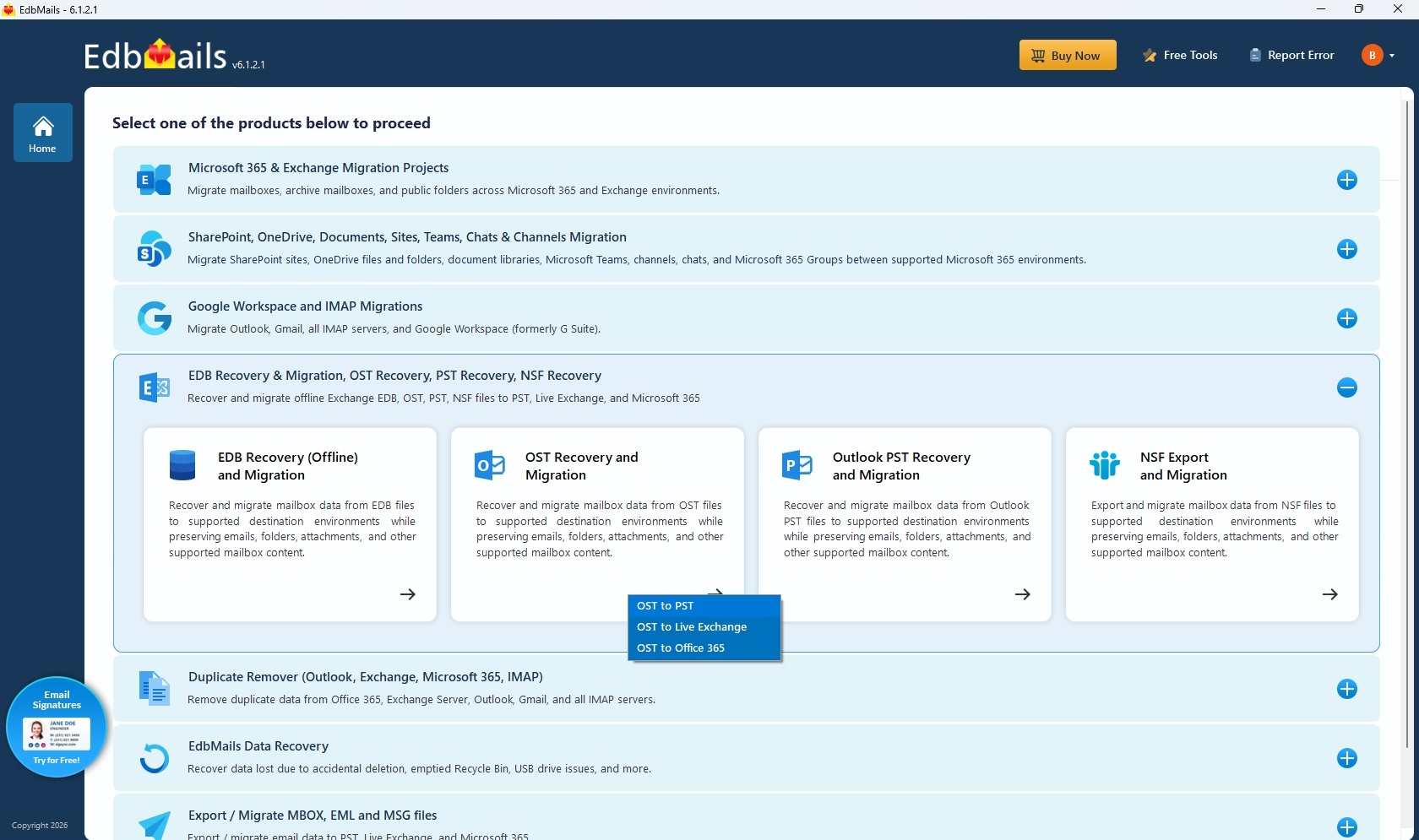
Step 2: Open OST Recovery and Migration in EdbMails
After selecting the relevant recovery workflow, an administrator adds the target OST sources for scanning. EdbMails examines available mailbox structures so the team can identify folders and items that are suitable for export.
Step 3: Preview important folders and items
Previewing recovered content before export allows administrators to prioritize what matters in each mailbox. For example, a former employee's Sent Items folder may be relevant to a contract review, while calendar entries or specific project folders may matter to an operational handover.
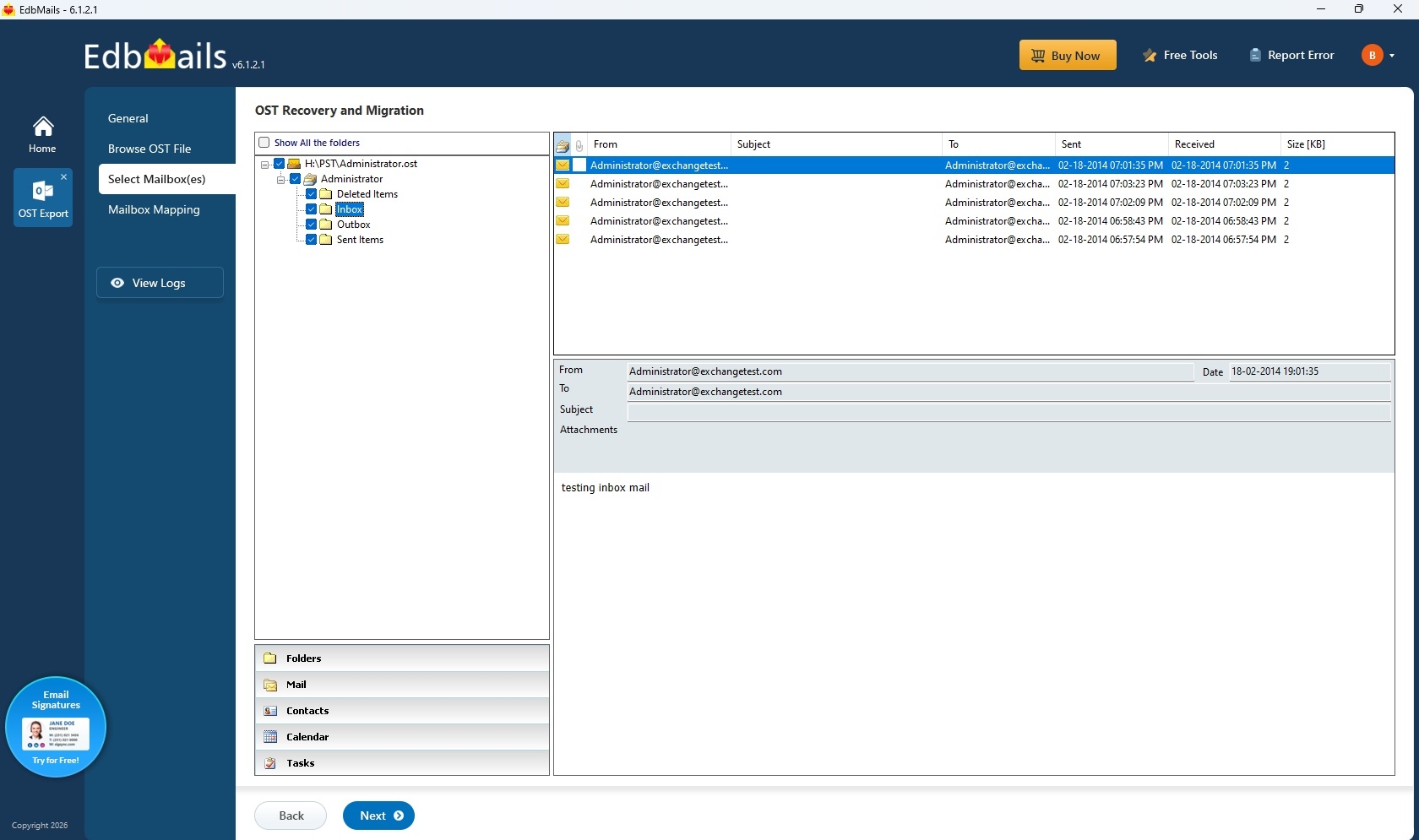
Step 4: Select the required data and export to PST
Instead of exporting every item without review, teams can select the necessary folders or messages and plan output PST files around their intended use. Keep each user's export easy to identify and apply consistent naming across the project.
For a visual walkthrough, see the guide to convert OST to PST using EdbMails.
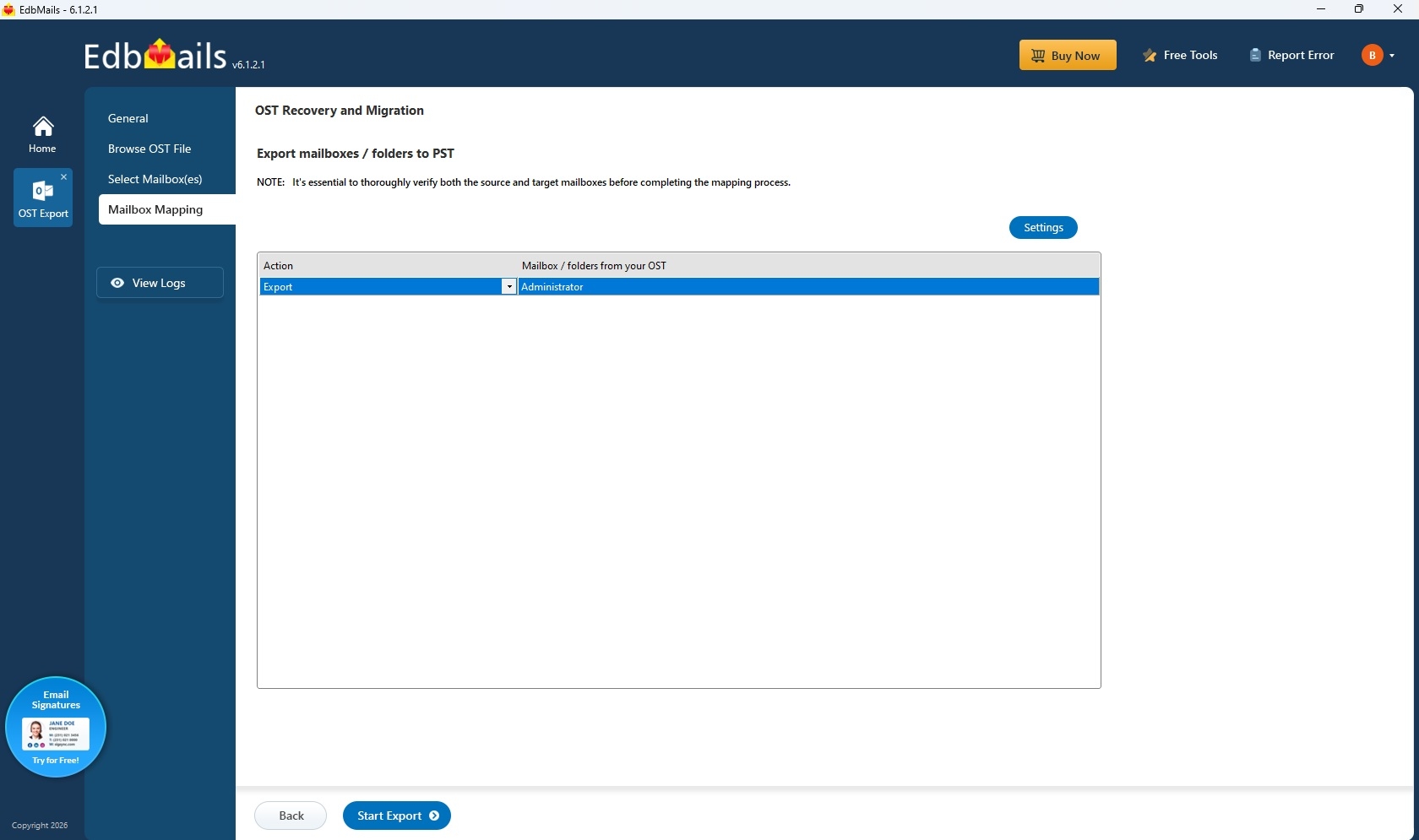
Step 5: Validate the PST files and document the result
Open the resulting PST in a supported Outlook environment, browse the folder structure and inspect a representative set of messages and attachments. Compare selected folder and item counts against the export report where available. Any incomplete items should be recorded and reviewed.
Recovery project checklist
Project stage | What the team checks | Why it matters |
|---|---|---|
Source inventory | Mailbox ownership, source file path and OST size | Prevents mix-ups between employee files |
Scan and preview | Visible folders, important emails and attachment availability | Establishes what information can be reviewed before export |
Export selection | Included folders, item selection and PST destination | Creates clear and traceable recovery outputs |
Export reporting | Processed, exported, failed or skipped items as reported | Supports follow-up and technical review |
Outlook validation | PST accessibility, folder structure and representative items | Confirms the output is usable for its intended purpose |
Archiving | Protected original sources, output locations and handover records | Supports later audits and mailbox retrieval |
How enterprise teams benefit from this approach
Less dependence on retired infrastructure. When original Outlook profiles are unavailable, locally retained OST files may still contain content worth recovering. EdbMails provides a workflow for evaluating those files independently of their former Exchange connection.
Focused exports rather than unnecessary bulk. Preview and selective recovery allow administrators to concentrate on business-critical folders, avoiding a one-size-fits-all extraction plan.
Better traceability. Export reports and a structured source inventory give IT teams a clearer way to review what was selected, processed and made available in PST form.
Flexibility after recovery. PST archives can support offline review in Outlook, while the broader EdbMails software workflow includes options for moving recovered content into Microsoft 365 or Exchange environments.
Practical decisions that affect a large OST recovery
A 700 GB collection should be planned around available disk space, mailbox priorities and a consistent validation process. The source volume does not establish a universal processing time or a predictable PST size. Attachment-heavy folders, different cache settings and varying OST health can change both output volume and the amount of work required.
Where PST splitting is used, keep the split files labeled and organized so reviewers can locate the expected material. For migration projects, conduct a small representative pilot before broad deployment and make sure the destination environment is prepared.
Although the original Exchange connection or Outlook profile is not needed to scan an orphaned OST, the PST writing workflow requires a supported Outlook installation and configured profile. Verify the environment before scheduling a large conversion run.
Frequently asked questions
Is Outlook required for PST export?
EdbMails can scan, recover and preview an OST file without Outlook. A supported Outlook installation with a configured profile is required only when writing the recovered items to PST. Outlook is not required for direct OST to Microsoft 365 or Exchange migration.
How should recovered attachments be reviewed?
Choose a representative group of messages with different attachment types and sizes. Open the exported messages and confirm that the expected attachments remain accessible. Keep a record of any items that need follow-up.
Does a successful scan mean every historic email is present?
The scan shows the mailbox items present within the OST source. The amount of historical content depends on what was synchronized and preserved. Previewing relevant folders and verifying the export in Outlook gives administrators a practical view of what is usable.
Can 700 GB of OST files be converted into one PST?
The total is best treated as a collection of source mailboxes. Maintaining clearly identified PST outputs per mailbox or batch is generally easier to administer than forcing unrelated mailbox histories into one very large file.
Questions IT teams should resolve before beginning
Some organizations need a historical archive for reference, while others intend to restore access through a replacement Microsoft 365 or Exchange environment. These goals should be decided before export. For a mixed project, a practical approach may keep former-employee correspondence in controlled PST archives while directing active department mailboxes toward an approved destination. Separating these outcomes prevents unnecessary handling and helps administrators document exactly where recovered information belongs.
When a PST archive is only the first step
Where the objective is a live mailbox destination, EdbMails also offers related OST migration workflows, so the IT team can evaluate a direct migration route instead of building PST files as an intermediate step. A PST export remains useful for offline review and retention, but it does not have to be the only route when the goal is to return content to active use.
Managing output size and Outlook usability
Creating mailbox-specific PST files, and splitting larger outputs when appropriate, makes them easier to assign, verify and retain. It also avoids making a single oversized PST file the only point of access for an entire enterprise archive. The final archive design should match the expected Outlook usage and the organization's retention policy.
A 700 GB total OST collection does not imply that the final archive will be exactly 700 GB. PST files have their own storage structure, and exporting selected folders may produce substantially different output from exporting whole mailboxes. For this reason, the project should reserve sufficient working space for source copies, processing and finished exports, with additional room for validation copies.
What a meaningful validation report should contain
Large recovery projects benefit from consistent reporting, even when mailbox contents vary substantially. The administrative summary should combine the software's export information with a brief manual quality check in Outlook. This offers a more useful account of the result than a single total number of gigabytes.
Each archive entry can record the employee or shared mailbox, the original OST file name, the workstation or backup source, the selected folders, the exported PST path and the corresponding report. This small amount of administrative discipline is especially valuable when a legal or compliance team later asks for a particular period of correspondence.
Validation and record-keeping fields
Validation field | What to record | Reason for review |
|---|---|---|
Source identification | Owner, OST path, source size, collection date | Links the result to the correct mailbox |
Selected content | Included folders and item categories | Confirms recovery scope was intentional |
Export status | Reported processed, exported, skipped or failed items | Highlights entries requiring attention |
PST verification | Whether Outlook opened the file and sample items were readable | Checks practical usability |
Archive destination | Final PST path, access owner, backup status | Supports secure long-term storage |
Sample archive organization for a multi-mailbox project
The best archive is the one a new administrator can understand months later. Organize the output around mailbox ownership and recovery batches instead of mixing unrelated employees inside an enormous master file. A folder structure such as Department / Mailbox owner / Export date / PST files can support clear access controls and future retrieval.
How to divide a 700 GB archive into manageable recovery phases
A combined OST collection can contain years of business history, but the urgency of those messages differs. An efficient recovery plan starts with a risk-based sequence rather than simply sorting files by size. Recent executive correspondence, open customer matters and operational handovers normally take priority over dormant reference mailboxes. Working in phases helps the IT team deliver useful content sooner while keeping the entire collection traceable.
Phase | Mailbox group | Review focus | Expected handoff |
|---|---|---|---|
1 | Time-sensitive and business-critical | Selected folders, relevant attachments, calendar history | Validated PST sets for the immediate request |
2 | Department archives | Folder hierarchy, named projects and shared correspondence | Department-organized PST exports |
3 | Long-term historical mailboxes | Completeness of readable cached material and searchability | Indexed inventory and retained PST files |
4 | Final quality review | Export logs, naming consistency and sample checks | Archive register and formal handover |
Project outcomes
Working in phases, the team produced per-mailbox PST sets rather than one oversized file, validating each batch in Outlook before moving on. Across the collection the output came to 698 GB, staying in line with the 700 GB source once folder selection and PST structure were accounted for. Delivering the recovery in phases, with sampling and validation built into each batch, kept the work far more orderly than the repeated manual Outlook handling the team had first considered for the same set.
Validation sampled messages, attachments, contacts and calendar entries from several departments and compared folder and item counts against the export reports. Large mailboxes were checked individually to confirm that business-critical correspondence had transferred. Any incomplete items were recorded for follow-up rather than assumed complete on a finished progress bar.
Result | Value |
|---|---|
Source processed | 90 OST files, 700 GB |
Final PST archive | 698 GB across per-mailbox sets |
Delivery | Phased, per-mailbox PST sets |
Validation | Departmental sampling plus per-mailbox spot check |
Final assessment: A structured route from disconnected OST files to usable mailbox items
Enterprise Outlook recovery is rarely just a file conversion task. It involves understanding which information remains available, selecting the right data, organizing exports and verifying the results. EdbMails OST to PST Converter brings those steps into a practical recovery workflow, with mailbox preview, selective export, PST management and reporting.
For IT teams faced with multiple orphaned or disconnected OST files, EdbMails is a strong option to evaluate. Its combination of recovery functionality and related migration paths is particularly valuable when archived Outlook content needs to become accessible to the business again.
Official product: OST to PST Converter




