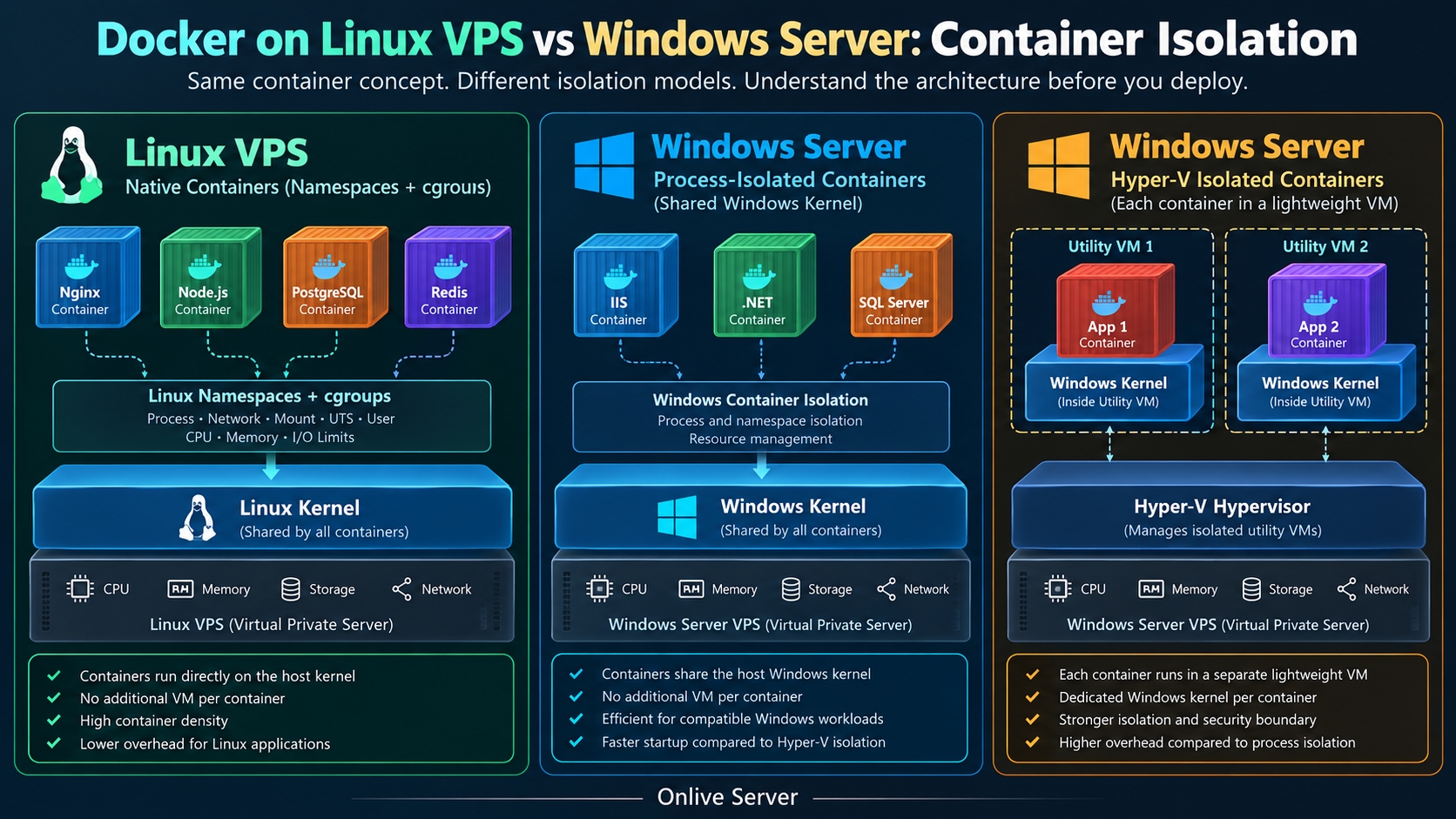
Docker containers can run on both Linux and Windows, but the operating system and isolation model determine how efficiently they use server resources. For most Linux-based applications, a Linux VPS provides a direct path to the Linux kernel without requiring an additional virtual machine for each container.
Windows Server supports containerization too. Its process-isolated containers share the Windows host kernel, while Hyper-V-isolated containers run inside lightweight virtual machines with separate kernels.
This distinction matters when deploying dozens of microservices, managing memory-constrained virtual servers, or deciding which operating system should host a production Docker environment.
For DevOps teams comparing Docker on Linux VPS vs Windows, the important questions concern kernel compatibility, container density, startup latency, storage performance, and application requirements.
How Docker Containerisation Works on a VPS
A Virtual Private Server (VPS) provides an isolated operating system environment with allocated CPU, memory, storage, and networking resources.
Docker Engine runs inside that environment and manages application containers using components such as containers and an Plug-compatible container runtime.
Unlike conventional virtual machines, containers generally don't need a complete guest operating system for every application instance.
Instead, containers package application binaries, dependencies, libraries, and configuration while relying on compatible operating system kernel functionality.
For example, a Linux VPS running Ubuntu can host several containerized services:
A Nginx reverse proxy handling HTTP requests.
A Node.js application serving an API.
A PostgreSQL database storing application data.
A Redis instance handling caching and background queues.
A monitoring service collecting operational metrics.
These services can run in separate containers while sharing the VPS's Linux kernel.
The same architectural principle applies to process-isolated Windows containers, although they require a compatible Windows kernel rather than a Linux kernel.
The real performance differences emerge from how each operating system implements isolation, resource management, filesystem operations, and virtualization.
Linux Containers: Namespaces and cgroups at the Kernel Level
Linux containerization relies on kernel capabilities that allow processes to operate in isolated environments without starting separate operating system kernels.
Two important mechanisms are Linux namespaces and control groups, commonly called cgroups.
Linux Namespaces: Isolating Application Processes
Namespaces control which operating system resources a process can see.
Different namespace types provide different forms of isolation.
A PID namespace gives containerized processes their own process ID view. A network namespace provides an independent networking environment with interfaces, routing tables, and ports.
Mount namespaces isolate filesystem mount views, while UTS namespaces separate hostname information.
User namespaces can map container user identities to different host identities, improving isolation when properly configured.
Consider two containers running separate web applications.
Both applications may believe they're running as process ID 1 inside their respective containers. The host operating system still tracks their actual processes independently.
This allows multiple applications to coexist without requiring a separate kernel for each one.
Linux cgroups: Managing CPU and Memory Consumption
Namespaces determine what processes can see. Control groups determine how much of certain system resources those processes can consume.
Linux cgroups can manage CPU scheduling, memory allocation, process counts, and supported I/O resources.
For example, an administrator can restrict a container to 512 MB of memory:
docker run -d \
--name api-service \
--memory=512m \
--cpus=1.0 \
nginx:stable
This command launches a Nginx container with a memory limit and a CPU allocation constraint.
The CPU setting represents a quota equivalent to one CPU core's processing time rather than permanently reserving a dedicated physical core.
If the container exceeds its available memory under applicable kernel memory-management conditions, processes may be terminated by the out-of-memory mechanism.
These controls are especially valuable on smaller VPS instances where a single misbehaving service could otherwise consume resources needed by other applications.
Why Native Linux Containers Avoid an Additional Hypervisor Layer
When Docker Engine runs directly inside a Linux VPS, its containers use the VPS guest's existing Linux kernel.
They don't require another guest operating system or a separate virtual machine for each container.
There is an important distinction here.
A VPS itself normally runs on virtualization technology such as KVM, Hyper-V, or VMware. Native Linux containers don't eliminate that underlying virtualization layer.
They avoid introducing an additional virtual machine boundary between the Linux VPS operating system and each container.
This can reduce per-container infrastructure overhead and simplify resource allocation.
For teams evaluating Windows and Linux VPS operating systems, this architectural difference is particularly relevant when deploying Linux-native application stacks.
Windows Server Containers: Process Isolation vs Hyper-V Isolation
Windows Server supports two primary container isolation modes.
Understanding these modes is essential because Windows containers do not always require Hyper-V.
Process-Isolated Windows Containers
Process-isolated Windows containers share the Windows host kernel.
They use Windows-specific namespace and resource-control technologies to separate containerized processes from one another.
Architecturally, this resembles the shared-kernel approach used by native Linux containers.
Process isolation can provide relatively efficient startup and resource utilization for compatible Windows applications.
It is particularly useful for workloads based on Windows Server Core or Nano Server container images.
However, Windows container compatibility depends on the relationship between the host operating system version and the container base image.
Some combinations require matching operating system builds or additional compatibility considerations.
Microsoft documents these requirements in its Windows container version compatibility guidance.
Hyper-V-Isolated Windows Containers
Hyper-V isolation adds a lightweight virtual machine boundary around a Windows container.
Each Hyper-V-isolated container operates with its own kernel instance inside an optimized utility VM.
This provides stronger isolation between the container and the host.
The trade-off is additional virtualization overhead.
Starting a Hyper-V-isolated container involves more than creating isolated processes. The runtime must also initialize the required virtualized environment.
This can increase startup time and memory consumption compared with process isolation, depending on the host, image, configuration, and workload.
Hyper-V isolation can be valuable when stronger workload separation is more important than maximizing container density.
For example, a hosting environment running workloads from separate customers may require a stronger isolation boundary than ordinary process isolation provides.
Important: Hyper-V isolation on a Windows VPS also depends on virtualization support. Nested virtualization must be available and supported by the underlying hosting environment.
Docker on Linux VPS vs Windows: Architectural Comparison
Feature | Native Linux containers | Windows process isolation | Windows Hyper-V isolation |
Kernel | Shared Linux kernel | Shared Windows kernel | Separate Windows kernel per utility VM |
Additional VM per container | No | No | Yes |
Primary isolation | Linux namespaces and cgroups | Windows process and namespace isolation | Hypervisor-backed isolation |
Linux application compatibility | Native | Not native | Not native |
Windows application compatibility | Not native | Supported Windows workloads | Supported Windows workloads |
Startup overhead | Generally low | Generally low | Usually higher |
Container density | Often favorable for Linux workloads | Depends on image and workload | Additional per-container VM overhead |
Security boundary | Shared-kernel isolation | Shared-kernel isolation | Stronger hypervisor isolation |
Typical use | Linux microservices | Windows-native services | Strongly isolated Windows workloads |
This comparison describes architectural characteristics rather than benchmark results.
Actual application performance depends on image size, storage latency, available memory, CPU contention, filesystem access patterns, and application initialization.
Why Container Density Matters on a VPS
Container density refers to how many useful application containers a server can run while maintaining acceptable performance and resource availability.
It is not simply the maximum number of containers that can start.
A server running 40 idle containers may use fewer resources than another server running five memory-intensive database containers.
For practical capacity planning, administrators should examine:
Baseline operating system memory consumption.
Memory used by each application and its dependencies.
Container runtime and networking overhead.
CPU usage under normal and peak traffic.
Filesystem cache and persistent storage requirements.
Resource headroom for updates, failures, and traffic spikes.
Consider a VPS with 4 GB of RAM.
A deployment might include a reverse proxy, two application services, Redis, and a database.
On a Linux VPS, those services can share the same kernel and use memory limits to reduce the risk of one application exhausting the entire server.
Hyper-V-isolated Windows containers introduce additional utility VM resources, which must be included in capacity planning.
This does not establish a universal number of containers per gigabyte of memory.
Container density depends heavily on the applications and isolation model.
For production environments, memory usage should be measured under representative workloads rather than estimated from container counts alone.
Container Startup Latency: Why the Isolation Model Matters
Container startup latency affects deployment speed, autoscaling, recovery, and rolling updates.
A containerized service may need to start after a server reboot, application failure, or deployment change.
Native Linux containers can often start quickly because the runtime creates isolated processes using an already-running Linux kernel.
Windows process-isolated containers follow a similar shared-kernel model.
Hyper-V-isolated containers require additional virtual machine initialization, which can increase startup overhead.
Still, container startup time is not the same as application readiness.
A container may be running while its application is still loading configuration, establishing database connections, or preparing internal caches.
Measuring Docker Container Startup Time
On a Linux VPS, administrators can measure container startup with a simple test:
docker pull alpine:3.20
/usr/bin/time -f "Elapsed: %e seconds" \
docker run --rm alpine:3.20 true
This measures the elapsed time for Docker to create and execute a short-lived container after the image has been downloaded.
It does not measure the time required for a production web application to become ready.
For meaningful comparisons, use the same measurement methodology across supported environments and record:
Image availability and caching conditions.
Container creation time.
Application initialisation time.
Health-check readiness.
Memory consumption during startup.
Repeat each test several times and report the distribution of results rather than selecting the fastest run.
Claims that Linux containers always start in under one second or Windows containers always require 10–30 seconds should not be treated as universal facts without reproducible testing.
Can You Run Linux Containers on a Windows VPS?
Linux containers require Linux kernel functionality.
A Windows kernel cannot directly provide the complete Linux system-call interface required by ordinary Linux container workloads.
On compatible Windows systems, a Linux virtual machine or virtualization-based environment can supply the required kernel.
WSL2 is one example of a lightweight Linux virtualisation environment commonly used with Docker Desktop on supported Windows client systems.
However, Docker Desktop and WSL2 development workflows should not be confused with production Windows Server container hosting.
On Windows Server, support for Linux container deployments depends on the chosen virtualisation platform, runtime, and vendor-supported configuration.
A Windows VPS provider must also support any required nested virtualization.
For teams whose production applications primarily use Linux container images, deploying a Linux VPS directly is usually simpler than introducing a Linux virtual machine inside Windows.
This avoids managing an additional operating system layer and reduces potential compatibility complications.
Docker Storage Performance: OverlayFS and Windows Container Filesystems
Container storage is another important consideration when comparing operating systems.
Docker images consist of layers that allow applications to reuse common filesystem content.
On Linux, OverlayFS has traditionally provided an efficient mechanism for combining image layers with a writable container layer.
Docker installations using the classic overlay2 storage driver rely on OverlayFS functionality.
Modern Docker Engine versions may instead use containerd image storage and snapshotters, depending on the installation and configuration.
Windows container hosts use a different storage implementation, including the windows-filter storage driver.
The performance characteristics of these approaches differ because they interact with different operating system filesystems and storage mechanisms.
Why Filesystem Workloads Matter
A container performing occasional configuration reads behaves differently from a database generating continuous random writes.
Applications that create large numbers of small files may also behave differently from services primarily handling network traffic.
Copy-on-write operations, metadata updates, antivirus scanning, filesystem caching, and underlying disk performance can all influence results.
For databases and other persistent workloads, writ-able container layers are generally not the preferred location for important application data.
Use suitable persistent volumes or bind mounts, with filesystem and backup choices matched to the database's requirements.
A VPS with fast NVMe storage can help reduce storage latency, but NVMe alone doesn't guarantee strong container performance.
The virtualisation stack, storage contention, filesystem configuration, and application I/O patterns still matter.
Docker Compose on Linux VPS for Micro-service Deployment
Docker Compose provides a practical way to define and run multiple related containers.
It is particularly useful when a development team needs to deploy a small application stack on one VPS without introducing the operational complexity of a full container orchestration platform.
A basic Compose configuration might look like this:
services:
web:
image: nginx:stable
ports:
- "8080:80"
restart: unless-stopped
depends_on:
- api
api:
image: node:22-alpine
working_dir: /app
volumes:
- ./app:/app
command: ["node", "server.js"]
restart: unless-stopped
This example assumes that the local ./app directory contains a working Node.js application with a server.js entry point.
Start the services using:
docker compose up -d
Check running containers:
docker compose ps
Inspect service logs:
docker compose logs --tail=100
This setup demonstrates how an application and reverse proxy can run as separate services while sharing the VPS's Linux kernel.
For production deployments, teams should also configure health checks, appropriate restart policies, resource limits, secret management, persistent storage, and access controls.
Bind-mounted source code may be convenient during development, but production environments often benefit from immutable application images built through a controlled CI/CD pipeline.
When Docker Compose Is Enough
Docker Compose is suitable for many single-server deployments.
It can manage service definitions, container networks, volumes, and startup configurations without requiring a Kubernetes control plane.
However, Docker Compose doesn't automatically provide multi-node scheduling or cluster-wide failover.
Applications that require deployment across several hosts, sophisticated auto-scaling, or advanced orchestration may need Kubernetes or another orchestration platform.
The appropriate choice depends on operational requirements rather than the number of containers alone.
Security: Shared-Kernel Containers vs Hypervisor Isolation
Security is one area where choosing the lowest-overhead architecture is not always the best decision.
Linux containers and process-isolated Windows containers share their host operating system kernels.
Although namespaces and other security mechanisms restrict access, a kernel-level vulnerability can potentially affect multiple containers using that kernel.
Administrators should apply self-defeating controls, including:
Running applications without unnecessary root or administrator privileges.
Removing unneeded Linux capabilities.
Applying sec-comp, Apparat, or SELinux policies where supported.
Keeping container images and operating systems patched.
Limiting exposed network ports.
Protecting secrets and persistent volumes.
Scanning images for known vulnerabilities.
Hyper-V isolation offers a stronger boundary because containers run inside separate utility virtual machines.
That additional protection can justify its resource cost for workloads requiring stronger separation.
For ordinary Linux application deployments, placing containers inside a dedicated VPS already provides a virtualisation boundary between the VPS and the underlying physical host.
That does not mean every container inside the VPS is independently protected by a hypervisor.
All native containers inside the same Linux VPS still share that VPS's kernel.
Choosing VPS Resources for Container Hosting
Selecting a VPS for Docker should begin with application requirements rather than an arbitrary container count.
A lightweight API and reverse proxy may run comfortably on modest resources, while a database-heavy application may require significantly more memory and storage throughput.
The following considerations help determine an appropriate configuration.
CPU Allocation
CPU requirements depend on application concurrency, request processing, encryption, background jobs, and database activity.
Monitor CPU throttling and sustained utilisation before deciding whether more vCPUs are necessary.
Memory Capacity
Account for the operating system, Docker services, application processes, databases, caches, and filesystem buffers.
Avoid allocating all available memory to container limits without leaving sufficient capacity for the host.
Storage and I/O
Persistent applications need reliable storage with suitable latency, throughput, and backup capabilities.
Databases should be tested using realistic read/write patterns rather than relying only on advertised storage specifications.
Operating System Compatibility
Linux is generally the straightforward choice for Linux-native applications and common open-source container images.
Windows Server remains relevant for workloads that depend on Windows APIs, Windows container images, or specific Microsoft application requirements.
Teams evaluating VPS server hosting options should confirm available operating systems, virtualisation support, resource allocations, and management responsibilities before deployment.
For Hyper-V-isolated containers inside a Windows VPS, nested virtualisation support is especially important.
Common Docker Performance Problems on VPS Hosting
Even a correctly configured Docker environment can experience performance issues.
High Memory Usage
Container memory limits may be too generous, or an application may retain memory unnecessarily.
Use:
docker stats
This displays live resource statistics for running containers.
Investigate memory consumption before increasing server capacity.
Slow Container Startup
Startup delays may result from large application initialization tasks, slow storage, dependency checks, or image download time.
Separate image-pull time from container creation and application readiness when troubleshooting.
Poor Database Performance
Running a database inside a container does not automatically make database operations faster or slower.
Storage configuration, memory availability, indexing, transaction patterns, and I/O contention usually deserve investigation first.
CPU Throttling
Containers with restrictive CPU quotas may experience increased request latency during traffic spikes.
Review CPU usage and throttling metrics before changing limits.
Networking Bottlenecks
Container networking introduces routing, address translation, firewall, and virtual interface considerations.
For high-throughput services, measure network performance under the actual deployment configuration instead of assuming every Docker network mode performs identically.
When Should Dev Ops Teams Choose Linux or Windows VPS?
A Linux VPS is generally a strong choice when the application stack consists of Linux container images, open-source databases, web servers, and micro-services.
It provides native access to Linux kernel features and avoids an additional Linux virtualisation environment.
Windows Server is appropriate when application dependencies require Windows functionality.
Process-isolated Windows containers can provide efficient container execution when host and image compatibility requirements are satisfied.
Hyper-V-isolated containers are worth considering when stronger isolation or particular compatibility requirements justify their additional resource overhead.
The decision should be driven by application compatibility, security boundaries, resource utilisation, and operational support.
For most Linux-native Docker workloads, a Linux VPS is the more direct deployment architecture. For Windows-native applications, Windows Server containers remain a valid and sometimes necessary choice.
Frequently Asked Questions
Is Docker faster on Linux VPS than Windows VPS?
For Linux-native applications, Docker running directly on a Linux VPS avoids the additional Linux virtualisation environment that may be needed on Windows. Actual performance depends on the workload, runtime, storage, and isolation mode. Windows process-isolated containers can also run efficiently for compatible Windows applications.
Can Docker run on a Windows Server VPS?
Yes. Windows Server supports Windows containers using compatible container runtimes. Process isolation and Hyper-V isolation have different compatibility and virtualisation requirements. Hyper-V isolation inside a VPS requires supported nested virtualisation.
Does Docker require Hyper-V on Windows Server?
Not for every container. Windows Server supports process-isolated Windows containers that share the host kernel. Hyper-V isolation is a separate option that provides a stronger isolation boundary.
How many Docker containers can run on a 4 GB VPS?
There is no universal limit based only on RAM. Capacity depends on application memory consumption, operating system overhead, runtime configuration, and workload intensity. Measure peak memory usage and leave headroom for the operating system and unexpected load.
Is Docker Compose suitable for production VPS hosting?
Yes, Docker Compose can be suitable for production workloads on a single server when properly configured and maintained. It does not provide the same multi-node scheduling, cluster failover, or orchestration features as Kubernetes.
Can Linux containers run directly on the Windows kernel?
No. Standard Linux containers require Linux kernel functionality. Running them in a Windows environment generally requires a compatible Linux virtualized environment or another supported Linux execution platform.
Is Hyper-V isolation more secure than ordinary container isolation?
Hyper-V isolation provides a stronger security boundary because each container operates inside an isolated utility VM. Shared-kernel containers rely on operating system isolation controls and do not provide the same hypervisor-backed separation.
Final Assessment
Linux VPS hosting is usually the practical starting point for teams deploying Linux-based Docker applications. Native kernel integration, mature container tooling, and straightforward deployment make it well suited to micro-services, APIs, web applications, and development infrastructure.
Windows Server containerisation serves a different set of requirements. Process isolation supports efficient execution of compatible Windows workloads, while Hyper-V isolation provides stronger separation at an additional infrastructure cost.
The best choice is the platform that runs the required application correctly, meets its security needs, and maintains predictable performance under real production traffic.