Overview: Zimbra is an email and collaboration platform used by individuals and organizations to manage emails, contacts, calendars, and other mailbox data. However, when users need to migrate to another email platform, create email backups, or access Zimbra data in different applications, converting mailbox files into a compatible format may become necessary.
Zimbra stores mailbox data in TGZ archives, which can be difficult to use directly in email clients such as Microsoft Outlook or other platforms. Manually transferring emails can also become time-consuming when working with multiple mailboxes, large archives, attachments, and folder structures.
A Zimbra converter helps simplify this process by converting Zimbra mailbox data into formats that are compatible with other email clients and services.
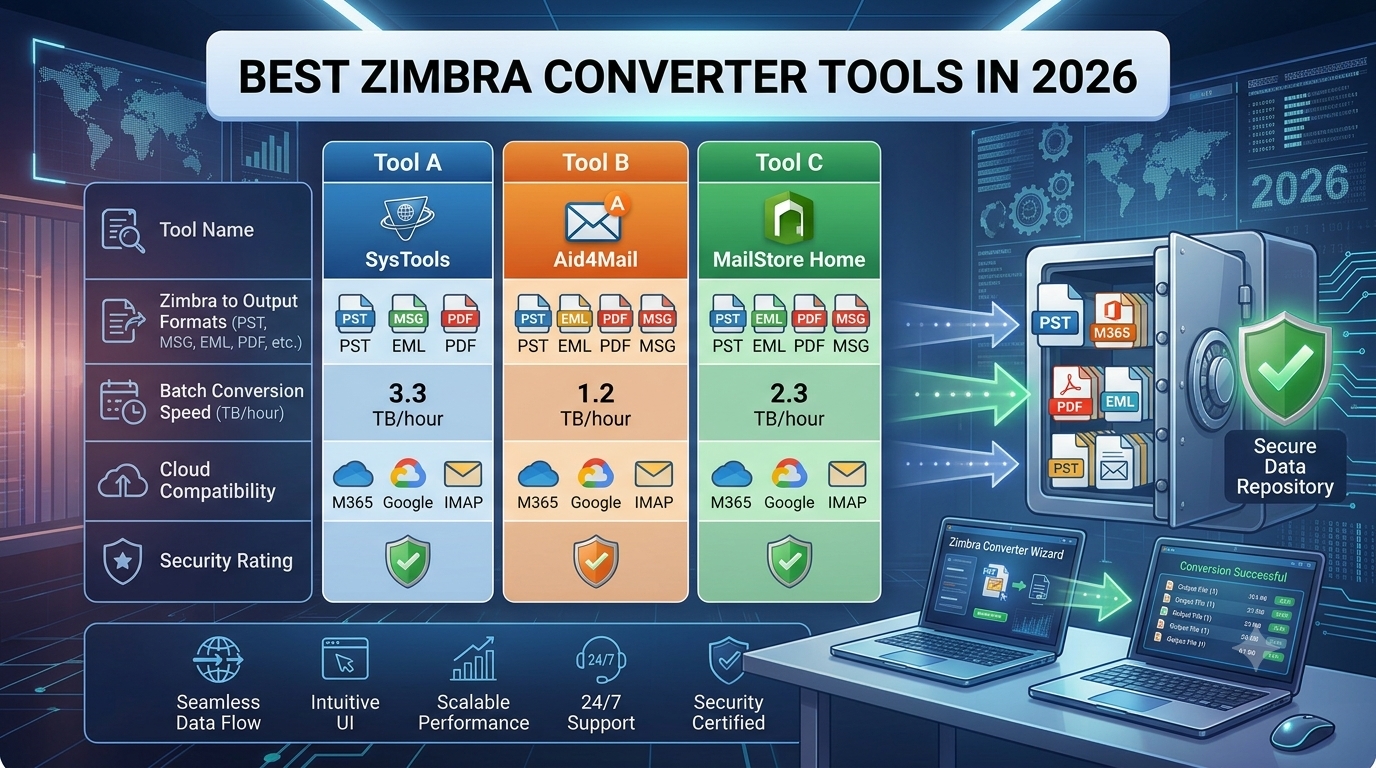
In this article, we compare the top 3 Zimbra converter tools in 2026 based on supported output formats, bulk conversion capabilities, data preservation, ease of use, and suitable use cases.
Top 3 Zimbra Converter Tools
Tool | Best For | Bulk Conversion | Multiple Output Formats | Folder Preservation |
SysTools Zimbra Converter | Complete Zimbra mailbox conversion | Yes | Yes | Yes |
Aid4Mail | Advanced email conversion and migration | Yes | Yes | Yes |
MailStore Home | Email archiving and centralized storage | Yes | Limited to its supported export options | Archive organization |
Note: Features and compatibility depend on the product edition and version. Verify the current vendor documentation before selecting a tool.
1. SysTools Zimbra Converter – Best Overall Choice
SysTools Zimbra Converter is a dedicated solution for users who need to convert Zimbra TGZ mailbox files into formats compatible with other email clients and platforms.
The software supports converting Zimbra mailbox data into formats such as PST, PDF, EML, MSG, MBOX, and HTML. It also provides migration options for services such as Office 365 and Gmail, along with export options for contacts and calendar data where supported.
One of its main advantages is that users can work with Zimbra mailbox data without depending on Zimbra Desktop. This can be useful when the original Zimbra environment is no longer available or users need to access archived mailbox data in another application.
The software is particularly relevant for users who need to migrate Zimbra emails to Outlook, move mailbox data to another email platform, or create accessible copies of their existing emails.
Key Features:
Convert Zimbra TGZ files into multiple supported output formats.
Export emails to PST for use with Microsoft Outlook.
Convert emails into EML, MSG, MBOX, PDF, and HTML formats.
Migrate Zimbra mailbox data to supported cloud email services.
Export supported contact and calendar data.
Process multiple mailbox files in a batch.
Maintain folder hierarchy during supported conversion operations.
Preserve important email properties, including sender, recipient, subject, and date.
Retain email attachments and inline images where supported.
Apply filters based on available options, such as date, sender, recipient, and subject.
Work with Zimbra mailbox data without requiring Zimbra Desktop.
Why Choose SysTools Zimbra Converter?
The main advantage of SysTools Zimbra Converter is its focus on Zimbra mailbox conversion. Instead of manually exporting messages or transferring emails one at a time, users can select their source files, choose a suitable output format, configure the available options, and start the conversion.
For example, someone moving from Zimbra to Outlook can convert mailbox data into PST format. Users who need to access individual messages in another email client can choose a compatible format such as EML or MSG. PDF and HTML exports can also be useful when the goal is to retain readable copies of emails for reference or documentation.
This flexibility makes the software suitable for different migration and backup requirements.
Best for: Individuals, IT professionals, and organizations that need to convert Zimbra TGZ files into multiple email formats or migrate mailbox data to another email platform.
2. Aid4Mail – Best for Advanced Email Migration
Aid4Mail is an email conversion and migration solution designed for users who need to process mailbox data from different sources.
It supports various email migration workflows and provides options for converting, filtering, and processing email messages. Depending on the edition and supported source formats, it can be useful for organizations handling email archives or transferring messages between different email systems.
Aid4Mail is worth considering when Zimbra-related conversion is part of a broader email migration project rather than a simple one-time export.
Key Features
Convert and migrate supported email formats.
Process large collections of email messages.
Apply filters to select relevant email data.
Support batch email processing.
Assist with email archive conversion.
Provide options for handling email properties during migration.
Support professional email migration workflows.
Offer different capabilities depending on the product edition.
Why Choose Aid4Mail?
Aid4Mail may be suitable when an organization needs to process emails from several sources, apply detailed filtering rules, or manage a more complex migration workflow.
For example, an IT administrator may need to consolidate email archives, filter messages by date, or prepare mailbox data for another email system.
However, users should confirm whether their specific Zimbra TGZ files are supported by the selected Aid4Mail edition and whether any intermediate conversion step is required. Its suitability depends on the source format and the intended destination.
Best for: IT professionals and organizations that need advanced email conversion, filtering, and migration capabilities across supported formats.
3. MailStore Home – Best for Personal Email Archiving
MailStore Home is an email archiving application designed primarily for personal use. It helps users collect and store emails from supported email clients and accounts in a centralized archive.
Rather than functioning as a general-purpose Zimbra TGZ converter, MailStore Home focuses on creating and managing an email archive. It may be useful when the main objective is to preserve emails from a supported source and access them from a central location.
Users considering it for a Zimbra migration should first verify whether their existing Zimbra mailbox can be accessed through a supported connection or source format.
Key Features:
Archive emails from supported email sources.
Maintain a centralized collection of archived messages.
Search stored emails.
Organize email data within the archive.
Help retain copies of important messages.
Support email access and export through available application features.
Why Choose MailStore Home?
MailStore Home can be useful for individuals who want to preserve personal email data instead of migrating an entire Zimbra mailbox into another email client.
For example, a user who has access to a supported email account may want to archive messages before closing the account or changing email services.
However, it should not be treated as a direct replacement for a dedicated Zimbra TGZ converter without verifying source compatibility. Users who specifically need to convert Zimbra TGZ files into PST, EML, MBOX, PDF, or other formats should prioritize tools that explicitly support that requirement.
Best for: Personal users who want to archive emails from supported sources and manage them in a centralized collection.
What Should You Look for in a Zimbra Converter?
Choosing the right Zimbra converter becomes easier when you understand which features matter most.
1. Zimbra TGZ File Support
First, check whether the software supports your existing Zimbra mailbox files. A tool designed for general email conversion may not necessarily support Zimbra TGZ archives directly.
If you already have exported Zimbra mailbox files, select a converter that explicitly supports that source format.
2. Multiple Output Formats
Your destination determines which output format you need. PST is useful for Outlook migration, EML and MSG can help with compatible email applications, MBOX is supported by several email clients, and PDF or HTML may be suitable for readable email records.
Choose a tool that supports the format required for your migration or backup.
3. Bulk Conversion
If you need to convert multiple mailboxes or large archives, batch processing can reduce repetitive work. Check whether the software can process several files in one operation and whether it has any file-size or edition-related limitations.
4. Folder Structure Preservation
Zimbra mailboxes may contain several folders and subfolders. A suitable converter should preserve the original folder hierarchy wherever supported, making it easier to locate emails after migration.
5. Attachment and Metadata Preservation
Business emails often contain important attachments and message details. Check whether the software retains attachments, inline images, sender and recipient information, subject lines, dates, and other relevant email properties.
6. Migration Destination
Not every converter supports every email platform. Before purchasing a tool, confirm that it supports your intended destination, whether that is Outlook, Gmail, Office 365, another email client, or a local archive.
7. Ease of Use
A clear workflow can simplify migration, especially for users who are not familiar with email storage formats. Look for straightforward file selection, output settings, and progress information.
8. Data Security and Privacy
Email archives may contain confidential business or personal information. Review how the tool handles mailbox data, where conversion takes place, what permissions it requires, and whether its security practices meet your organization's requirements.
Which Zimbra Converter Is Best for You?
Different tools are suitable for different requirements.
Choose SysTools Zimbra Converter if:
You need a dedicated Zimbra TGZ conversion solution.
You want to convert Zimbra emails into PST, EML, MSG, MBOX, PDF, or HTML.
You need to process multiple mailbox files.
You want to migrate Zimbra data to a supported email platform.
You need to retain folder organization and important email properties.
You want to preserve attachments and inline images where supported.
You prefer a dedicated conversion workflow without relying on Zimbra Desktop.
Choose Aid4Mail if:
You need broader email conversion and migration capabilities.
You work with multiple supported email formats.
You require filtering options during migration.
You manage complex email processing projects.
Your specific Zimbra source format is supported by the selected edition.
Choose MailStore Home if:
Your primary goal is personal email archiving.
You want to keep emails in a centralized archive.
You need to search and access stored messages.
Your email source is compatible with its supported archiving methods.
You do not specifically require direct conversion of Zimbra TGZ files into multiple output formats.
Frequently Asked Questions
1. What is the best Zimbra converter in 2026?
SysTools Zimbra Converter is a suitable choice for users whose main requirement is converting Zimbra TGZ mailbox files into multiple formats or migrating mailbox data to another supported email platform. The best option ultimately depends on the source format, destination, and features required.
2. Can I convert Zimbra TGZ files to PST?
Yes. You can use a converter that explicitly supports Zimbra TGZ files and PST output. This allows you to prepare mailbox data for use with Microsoft Outlook, subject to the destination application's import requirements.
3. Can I convert Zimbra emails to Gmail or Office 365?
Yes. Some dedicated converters provide migration options for supported cloud email services. Check the selected tool's current compatibility, account requirements, and migration procedure before starting.
4. Can I convert Zimbra emails without Zimbra Desktop?
Yes, provided you have access to the required mailbox files and use a compatible converter that does not depend on Zimbra Desktop. A dedicated TGZ converter can be useful when the original desktop application is unavailable.
5. Will attachments be preserved during Zimbra conversion?
A suitable converter can retain attachments and other email properties when those items are supported by the source and destination formats. Check the software's documentation and test a small mailbox before processing important data.
6. Can I convert multiple Zimbra mailboxes at once?
Some converters support batch processing of multiple mailbox files. This can be helpful for organizations migrating several users or individuals managing multiple email archives. Confirm the tool's batch-processing and licensing limitations.
7. Is a Zimbra converter necessary for email migration?
Not always. If your email provider offers a supported direct migration method, you may not need a separate converter. However, dedicated conversion software can be useful when working with exported TGZ files, multiple output formats, archived mailboxes, or migration requirements that are not covered by the available native options.
8. Which output format should I choose for Zimbra conversion?
The right format depends on your goal. Choose PST for a compatible Outlook workflow, EML or MSG for supported email applications, MBOX for compatible mailbox clients, and PDF or HTML when you need readable copies of messages. For cloud migration, check whether the tool offers a direct supported migration option.
Conclusion
Converting Zimbra mailbox data becomes more complicated when users need to migrate multiple mailboxes, preserve attachments, maintain folder organization, or move emails to another platform.
Among the three options discussed, SysTools Zimbra Converter is the preferred choice for dedicated Zimbra TGZ conversion and multi-format export requirements. Its supported output formats and migration options make it relevant for users moving Zimbra data to Outlook, compatible email clients, or supported cloud services.
Aid4Mail is worth considering for advanced email conversion and filtering workflows, while MailStore Home is better suited to personal email archiving when the source is supported.
Before choosing a tool, confirm that it supports your existing Zimbra files, required output format, and data-preservation needs. Testing a small sample first can also help ensure that the converted mailbox meets your expectations.