AI has moved beyond systems that simply answer questions. Businesses are increasingly exploring software that can understand a goal, work through multiple steps, use connected tools, and complete parts of a workflow. This is where AI agents enter the picture.
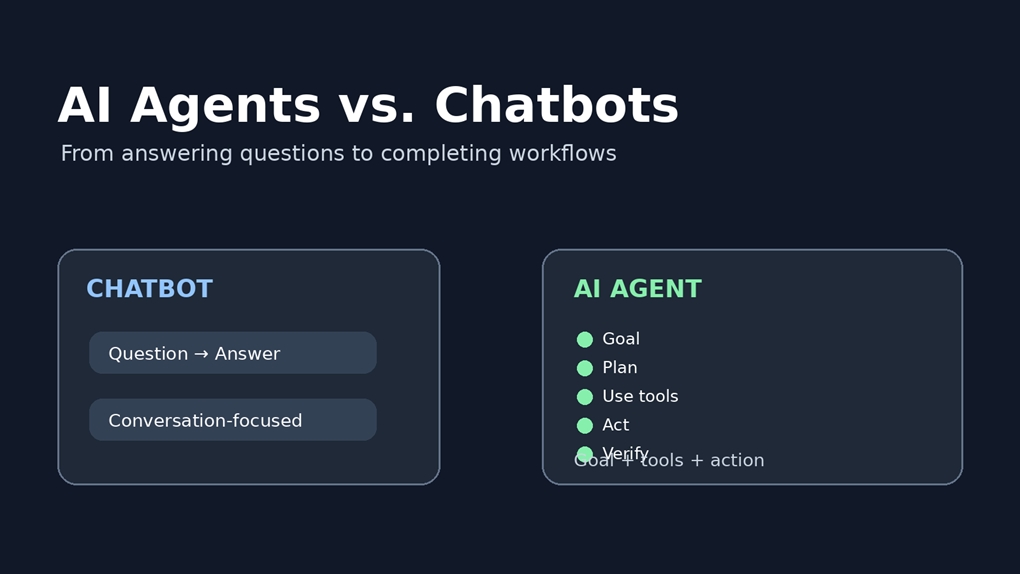
Chatbots remain valuable, especially for customer service, information access, and conversational support. The important distinction is that a chatbot is generally conversation-oriented, while an AI agent is designed around completing a goal.
What Is an AI Agent?
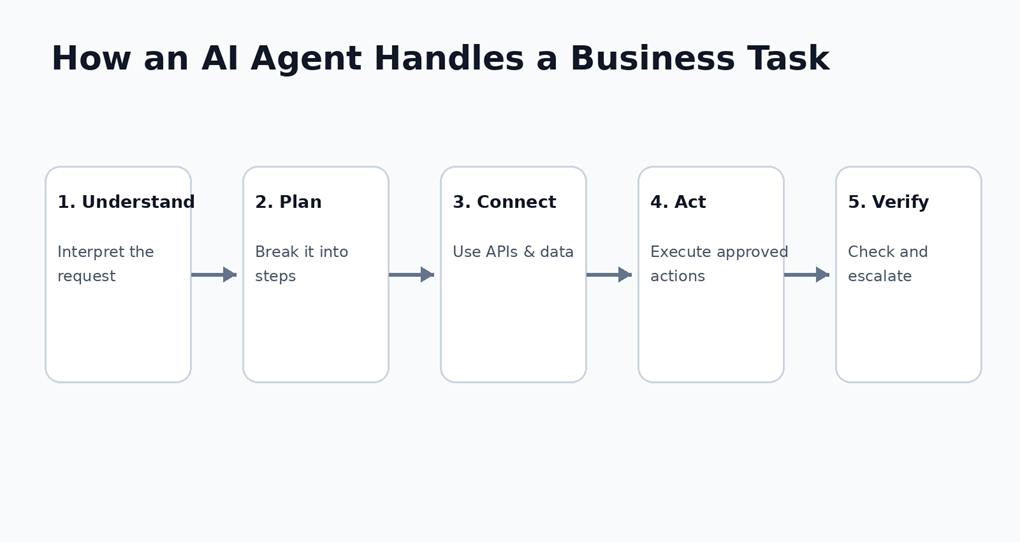
An AI agent is a software system that can interpret a request, decide what steps are needed, use available tools or data sources, take permitted actions, and evaluate the results. Depending on the workflow, it may continue through several steps or ask a human for approval.
For example, an employee might ask: “Find the latest sales leads, identify high-priority prospects, prepare a summary, and update the CRM.” A simple chatbot could explain how to do this. An agent could be connected to the CRM and approved business tools so it can retrieve information, analyze it, prepare the summary, and update selected fields.
How Does a Chatbot Work?
A chatbot is primarily designed for interaction. A user asks a question, the system interprets it, retrieves or generates an answer, and continues the conversation. Modern AI chatbots can maintain context, summarize information, search a knowledge base, and provide personalized responses.
For many organizations, that is exactly the right level of automation. If the goal is to answer frequently asked questions or help visitors find information, introducing a fully agentic workflow may add unnecessary complexity.
AI Agent vs. Chatbot: The Core Difference
The simplest distinction is: a chatbot is primarily conversation-oriented; an AI agent is goal-oriented.
Capability | Chatbot | AI Agent |
Answer questions | Yes | Yes |
Hold a conversation | Core purpose | Yes |
Follow multi-step objectives | Limited | Core capability |
Use external tools | Sometimes | Common |
Interact with business systems | Limited | Yes |
Take actions | Usually limited | Yes, within permissions |
Workflow automation | Limited | Strong use case |
Human escalation | Possible | Often important |
A Simple Real-World Example:
Consider an online retailer. A chatbot can answer, “Where is my order?” by retrieving the shipment status and giving the customer an expected delivery date.
Now imagine the customer says, “My order is late. Please check what happened and help me resolve it.” An AI agent could retrieve the order, check shipping information, compare the expected and actual delivery status, consult the refund or replacement policy, create a support case, and escalate the situation if it requires human approval.
The difference is not simply a better conversation. The agent is participating in the workflow.
How an AI Agent Handles a Business Task?
What Makes an AI Agent Work?
1. A Reasoning or Language Model
The model helps interpret requests, understand context, select appropriate actions, and generate responses. The model is an important component, but it is only one part of a production agent.
2. Tools and APIs
Tools connect the agent to the systems where real work happens. These may include CRMs, databases, ERP platforms, search systems, cloud services, ticketing tools, and internal APIs.
3. Memory and Context
Longer workflows can require the system to remember what it has already checked, which information it has retrieved, and what step comes next. Memory design should be intentional rather than unlimited.
4. Guardrails and Permissions
An enterprise agent should not automatically receive unrestricted access to every system. Role-based permissions, validation, approval steps, audit logs, monitoring, and escalation paths help keep autonomous actions within defined boundaries.
Where Can Businesses Use AI Agents?
Customer support: investigate issues, retrieve account information, create tickets, and escalate complex cases.
Sales operations: research prospects, qualify leads, summarize conversations, and update CRM records.
Finance operations: assist with invoice processing, reconciliation, reporting, and exception handling.
IT operations: investigate alerts, collect system information, recommend remediation, and escalate incidents.
Employee operations: help staff find information and complete routine HR, finance, and IT requests.
These use cases are driving interest in specialized AI Agent Development Companies that can integrate models with enterprise systems instead of treating AI as a standalone chat interface.
Where AI Chatbot Development Still Makes Sense
AI chatbots are far from obsolete. An AI Chatbot Development Company can help organizations build conversational experiences for customer support, knowledge access, lead qualification, onboarding, and website assistance.
If most customer interactions are informational and repetitive, a well-designed chatbot may solve the problem with less architectural complexity than an autonomous agent. The right technology should follow the workflow—not the other way around.
AI Agents Are Not Magic
There is a temptation to describe agents as systems that can simply be given a goal and left alone. Real deployments are more nuanced. Agents can misunderstand instructions, use the wrong tool, encounter incomplete information, or produce an incorrect result.
That is why autonomy should be designed around risk. Low-risk tasks can be automated more freely, sensitive actions can require approval, and high-impact decisions may need a human to remain responsible. Testing, monitoring, logging, and clear escalation paths are essential parts of an agentic system.
Do Businesses Need an AI Agent or a Chatbot?
There is no universal answer. A chatbot may fit when the primary requirement is answering questions, providing information, guiding users, handling FAQs, or supporting website visitors.
An AI agent may be more appropriate when the workflow involves multiple steps, tool and API usage, business-system integration, decisions within defined rules, or approved actions.
Some organizations will use both: the chatbot can provide the conversational interface while an agent handles more complex work behind the scenes.
The Bigger Shift: From AI That Answers to AI That Works
The more important change is not that chatbots are disappearing. It is that businesses are beginning to expect AI to participate in real work.
This shift is also influencing software engineering. AI-first development companies are increasingly designing applications where AI is part of the workflow from the beginning, rather than being added later as a small feature.
Instead of asking only, “Where can we add a chatbot?”, organizations can ask, “Which repetitive or complex workflow could AI safely help us complete?” That question often reveals more practical opportunities.
Final Thoughts
An AI agent and a chatbot can both use modern language models, but they are built around different purposes. A chatbot is primarily designed to communicate and provide answers. An AI agent is designed to pursue a goal, use tools, complete multiple steps, and take approved actions.
Neither approach is automatically right for every organization. The best starting point is the business problem: understand the workflow, users, data, systems, risk level, and required degree of autonomy.
For straightforward information-based interactions, a chatbot may be enough. For complex workflows that involve several systems and actions, an AI agent can provide a broader automation layer. In many real-world environments, the two will work together, with conversation at the front and intelligent workflow execution behind it.